To do an SEO audit, crawl the whole site, check it against a fixed list in six areas, rank the problems by how much they matter, and crawl again to prove the fixes worked. This guide gives you 12 steps, the free tool for each, and a link to our detailed guide for every part, so you can run a complete audit on your own site or a client’s.
It is written by the maker of SEOSage, an SEO audit app that crawls on your own computer with no page limit. The steps work with any crawler, and we say where a free tool is enough.
TL;DR
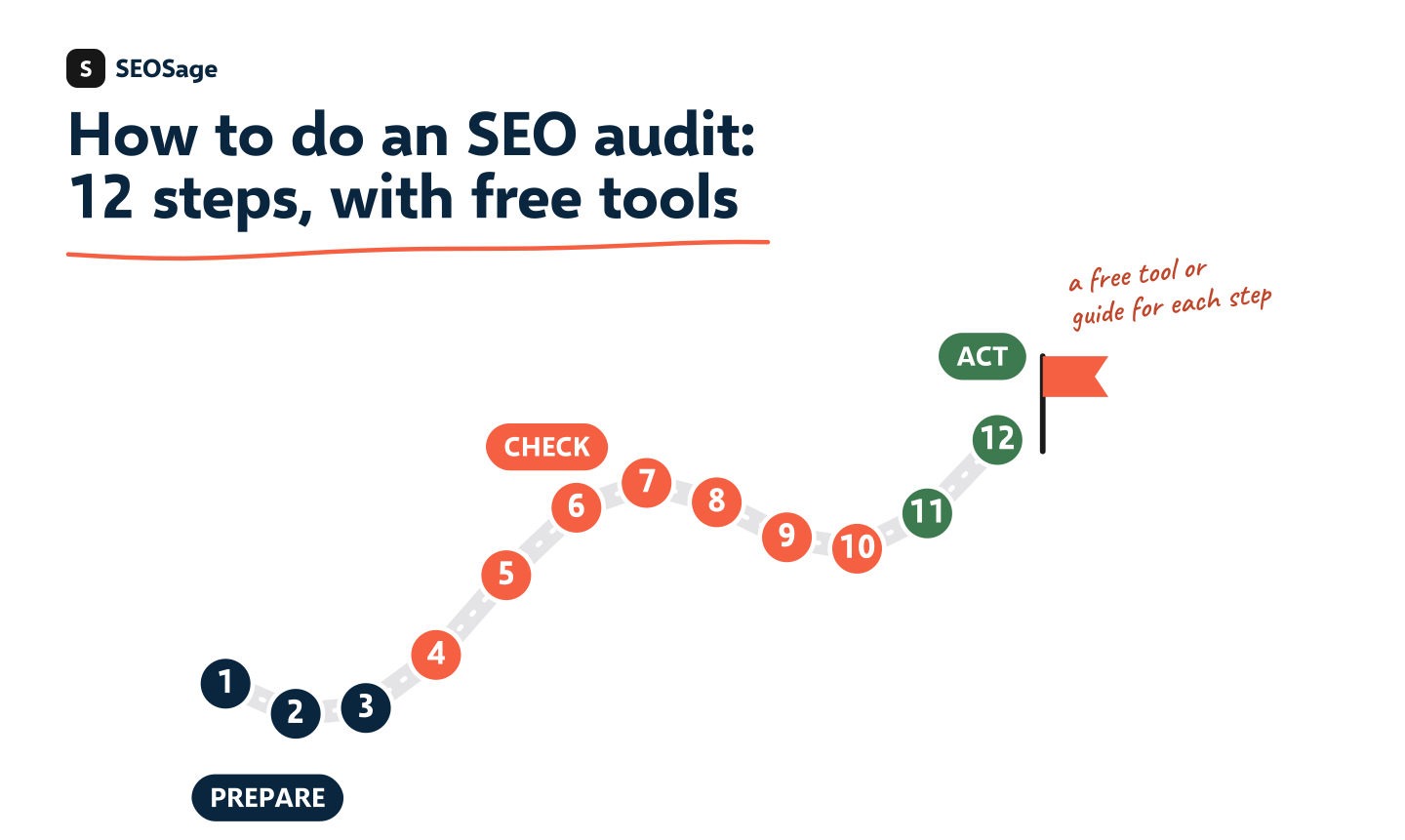
- An SEO audit has 12 steps in three stages: prepare (steps 1 to 3), check (steps 4 to 10) and act (steps 11 and 12).
- Crawl first. A crawler finds most problems in one pass, and you decide which ones matter.
- Rank fixes by what hides good pages from Google, not by the order a tool lists them.
- Crawl again after the fixes and compare, so you can prove the audit worked.
- Each step links to a detailed guide, a free checklist or a template.
What is an SEO audit? #
An SEO audit is a check-up that finds what stops search engines from finding, understanding and ranking a website’s pages, and ends in a ranked list of fixes. Our guide to what an SEO audit is explains the six areas and shows a real example. This page is the how-to.
How do you do an SEO audit? The 12 steps #
Stage 1: Prepare #
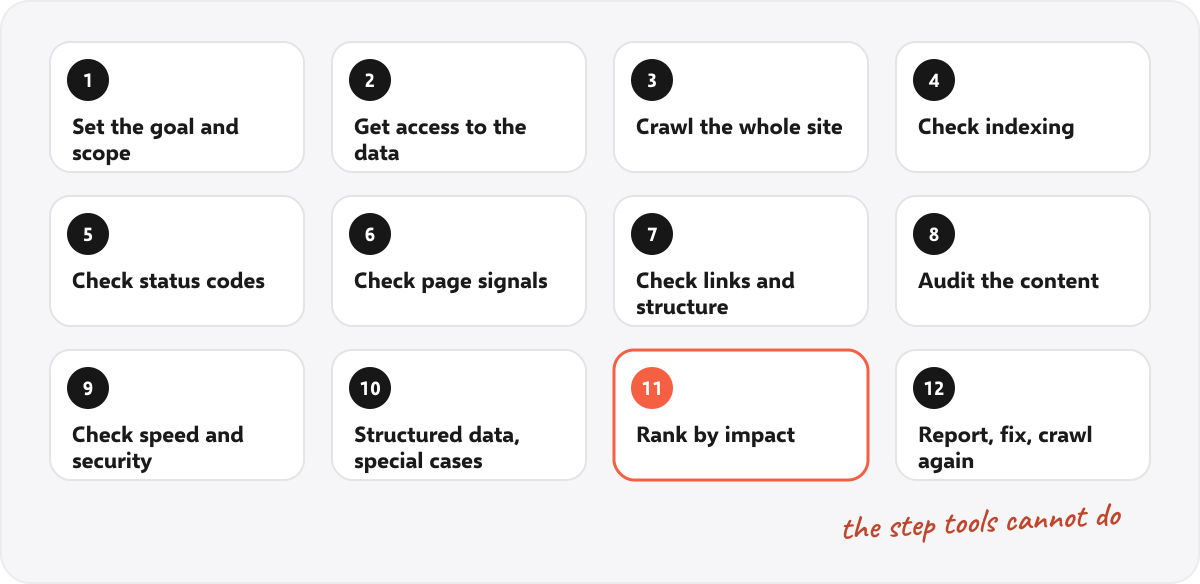
Step 1: Set the goal and the scope
Decide what the audit is for and which pages it covers. A new client, a traffic drop and a pre-launch check need different emphases. Write down the goal in one sentence, such as “find why the service pages lost visits”. If it is a client, note what the business wants from search, such as calls, bookings or sign-ups.
Step 2: Get access to the data
You need Google Search Console for the site, which shows what Google has indexed and which pages already get visits. Also ask for analytics access and, if you will fix things yourself, access to the website. Search Console is free.
Step 3: Crawl the whole site
A crawler follows every link from the home page, like a search engine, and records the status, title, headings, links and speed of each page. Crawl everything, not a sample, because problems often hide in the pages you did not look at. With SEOSage, add the site as a project and start. It runs on your own computer and has no page limit. See the SEO crawler and its crawl controls.
If the site is built with a framework that builds pages with scripts, crawl twice, with and without rendering. See our guide to the JavaScript SEO audit.
Stage 2: Check #
Steps 4 to 10 work through the crawl. Our technical SEO audit checklist covers steps 4 to 7, 9 and 10 in 25 checks, with a free printable PDF.
Step 4: Check crawling and indexing
Can Google reach the pages you want found? Check robots.txt, the sitemap and noindex tags. The most expensive mistake in an audit is a good page hidden by a stray noindex tag. Free tools: robots.txt tester, sitemap checker and noindex checker.
Step 5: Check status codes and redirects
List the pages that return errors, the soft 404s and the redirect chains. Fix any error page that has links or visits. Free tools: 404 checker and redirect chain checker.
Step 6: Check page signals
Every page needs its own title, a meta description, one H1, and one canonical address. Sort the crawl by title to find repeats. Free tools: meta description checker and the canonical tag checker.
Step 7: Check links and structure
Find orphan pages that nothing links to, pages that sit too deep, and broken links. Important pages should be within about three clicks of the home page. Look at orphan pages and the internal link checker.
Step 8: Audit the content
Look for thin, copied and out-of-date pages, and give each page one decision: keep, improve, merge, redirect, remove or noindex. Our SEO content audit guide has six steps and a free spreadsheet template.
Step 9: Check speed, mobile and security
Check how fast the server answers, how the main page types load on a phone, and whether the site uses HTTPS with no insecure parts. See Core Web Vitals, the security headers check and Google’s PageSpeed Insights.
Step 10: Check structured data and special cases
Test structured data with the schema markup validator, and the language tags on multilingual sites with the hreflang checker. Then add the checks for the type of site:
| Type of site | Extra checks |
|---|---|
| Local business | The same name, address and phone everywhere, a page for each location. See the local SEO audit. |
| Online store | Filter URLs, removed products, product markup. See the ecommerce SEO audit. |
| Software company | Pages that bring trials. See the SaaS SEO audit checklist. |
| JavaScript site | Content and links that exist only after rendering. See JavaScript SEO. |
Stage 3: Act #
Step 11: Rank the problems by impact
A crawl on a large site can list thousands of issues. Do not fix them in the order they appear. Rank them by what they cost:
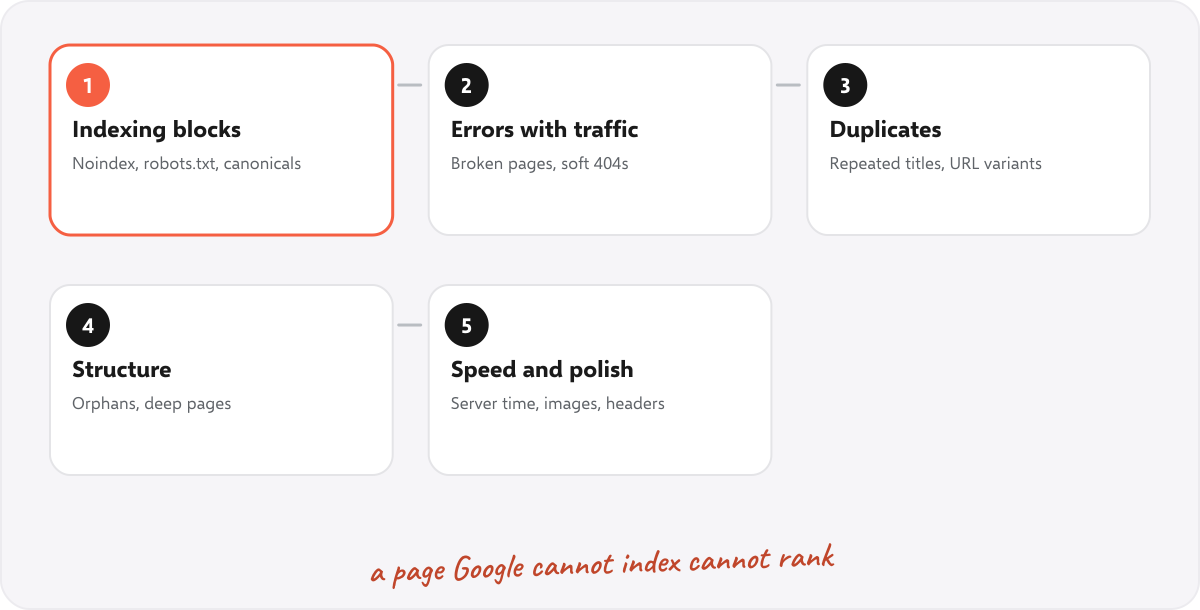
- Anything that hides a good page from Google: noindex tags, robots.txt blocks, wrong canonicals.
- Errors on pages with visits or links: broken pages, soft 404s, redirect problems.
- Duplicates: repeated titles, near-copies and URL variants.
- Structure: orphan pages, deep pages, weak internal links.
- Speed and polish.
Use Search Console to find the pages that already get visits and fix those first. SEOSage’s quick wins view lists searches where a page already ranks 4 to 10.
Step 12: Report, fix and crawl again
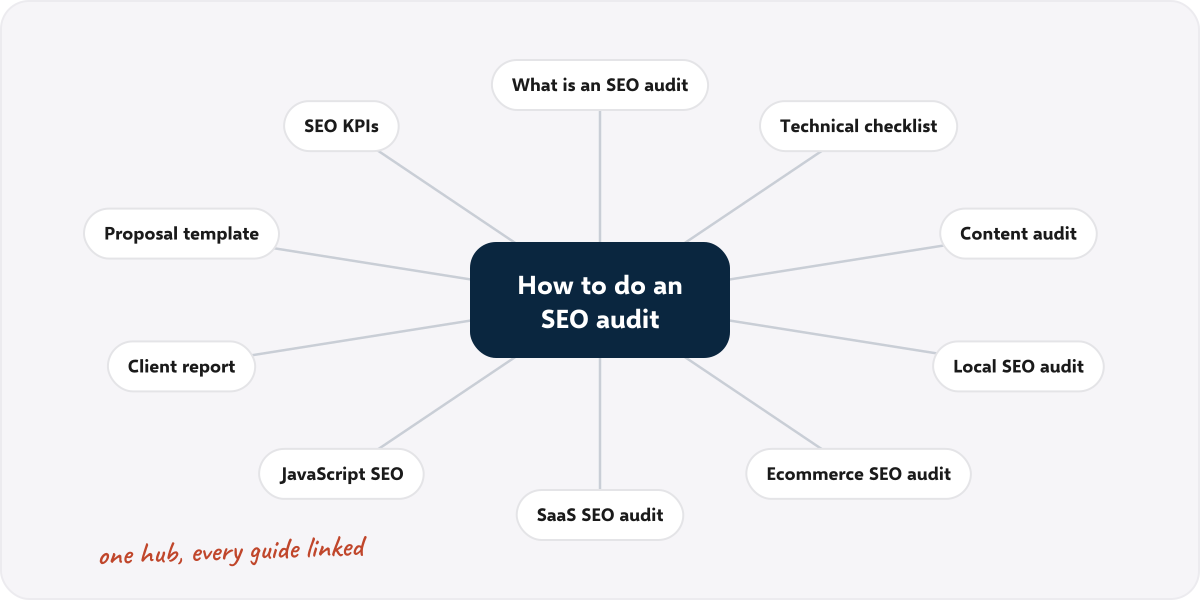
Write the audit up for whoever will act on it. Put the three biggest findings first, in plain words, and the full list in an attachment. Then fix, crawl again and compare. The compare view shows what was fixed, what is new and what got worse. For a client, see the SEO client report guide, the SEO proposal template and the SEO KPIs to track afterwards.
What does the result look like? A real audit #
We crawled marketingly.org with SEOSage three times. On 29 September 2026 the crawl checked 90 pages and the site scored 53 out of 100, with 9 kinds of error. The first finding was 14 pages with a noindex tag, which keeps them out of Google. On 12 October, after fixes, the site scored 98 with no errors. The page count had changed from 90 to 53, so the two scores are not a perfect like-for-like comparison, and we say so in our SEO KPIs guide. The point is the process: crawl, rank, fix, crawl again.
Which free tools can you use in an SEO audit? #
A free tool checks one page or one file at a time. They are enough for a small site and useful for checking one fix.
| Step | Free tool |
|---|---|
| 4. Crawling and indexing | robots.txt tester, sitemap checker, noindex checker |
| 5. Status codes and redirects | 404 checker, redirect chain checker |
| 6. Page signals | meta description checker, Open Graph checker, alt text checker |
| 7. Links | internal link checker |
| 10. Structured data and language | schema markup validator, hreflang checker |
See all of them on the free SEO tools page. For the whole site in one pass, use a crawler. SEOSage has a 14-day free trial, and plans start at $9 a month.
How do you read the results of a crawl? #
A crawl groups what it finds into issues. In SEOSage each issue is tagged as one of three levels, and each comes with why it matters and how to fix it:
| Level | What it means | What to do |
|---|---|---|
| Error | Something is broken or blocks a page, such as a 404, a broken redirect or a missing title | Fix first, starting with pages that matter |
| Warning | Something that hurts but does not break the page, such as a long title or a redirect chain | Fix in batches, after the errors |
| Notice | A polish item or something to review, such as a missing alt text on a decorative image | Look at it, and fix when it is cheap |
The levels are a guide, not an order of work. A single warning, such as a noindex tag on your best page, can matter more than fifty errors on pages nobody visits. That is why step 11 exists.
Can you do a quick SEO audit without a crawler? #
Yes, for a first look at a small site. These checks take about ten minutes each and need nothing but a browser:
- Open /robots.txt on the site. Make sure it does not say
Disallow: /for everything. - Open the sitemap (often /sitemap.xml) and check that the main pages are listed.
- Search Google for
site:yourdomain.com. Roughly how many pages does Google show? Is it far fewer than you expect? - View the source of the home page and look for a title, a description and a canonical tag. Look for the word
noindex. - Check Search Console’s Pages report for pages excluded from the index and the reason.
- Test the home page on a phone and with PageSpeed Insights.
- Click a few links on the main menu and check that nothing is broken.
This finds the big problems, but only on the pages you look at. For the whole site, use a crawler.
How long does an SEO audit take? #
The crawl takes minutes for a small site and a few hours for a very large one. Checking the results and ranking the fixes takes longer: roughly an hour for a small site and several days for a large one. Preparing the report adds more. Run the steps in order, and do not stop at the crawl.
How often should you do an SEO audit? #
Do a full audit when you start on a site, after any big change such as a redesign or platform move, and when traffic drops with no clear cause. Then crawl monthly and compare with the last crawl to catch new problems early.
Common mistakes when doing an SEO audit #
- Auditing a sample. Crawl the whole site.
- Fixing in the order the tool lists issues. Rank by impact first.
- Treating the score as the goal. A high score does not mean there is nothing left to improve.
- Handing over a list with no priorities. The ranking is the value.
- Skipping Search Console. Without it you cannot tell which pages matter.
- Not crawling again. You cannot prove the fixes without a second crawl.
Summary #
To do an SEO audit, set the goal, get Search Console, crawl the whole site, check the six areas, rank the problems by impact, then report, fix and crawl again. Use our free checklist, templates and tools for each part, and let a crawler do the checking while you decide what matters.
FAQ #
How do you do an SEO audit step by step? #
Set the goal, get access to Search Console, crawl the whole site, check crawling and indexing, status codes, page signals, links, content, speed and security, then rank the problems, fix them and crawl again.
How do I audit my own website for SEO? #
Crawl it with a crawler, work through the 12 steps, and use the free tools for one-page checks. Start by looking for pages that Google cannot index.
What do I need for an SEO audit? #
A crawler, access to Google Search Console and an hour or more to read the results. An SEO audit app such as SEOSage is a crawler built for this.
Can I do an SEO audit for free? #
Partly. Free tools check one page at a time and Search Console is free. A crawl of the whole site needs a crawler, and SEOSage has a 14-day free trial.
What is the first thing to check in an SEO audit? #
Whether the pages you want found can be indexed. Look for noindex tags, robots.txt blocks and wrong canonicals before anything else.
How do I do an SEO audit for a client? #
Follow the same steps, put the three biggest findings first in plain words, attach the full list and send a branded report. See the SEO client report guide.
Do I need an SEO audit checklist? #
It helps. Use our SEO audit checklist and the free printable technical SEO audit checklist.