An ecommerce SEO audit checks whether search engines can find, understand and rank your category and product pages. Online stores need their own audit because they create thousands of near-identical URLs through filters, sorting and product variants, and they retire products all the time. This guide gives you a 20-step checklist, in the order we would work through it.
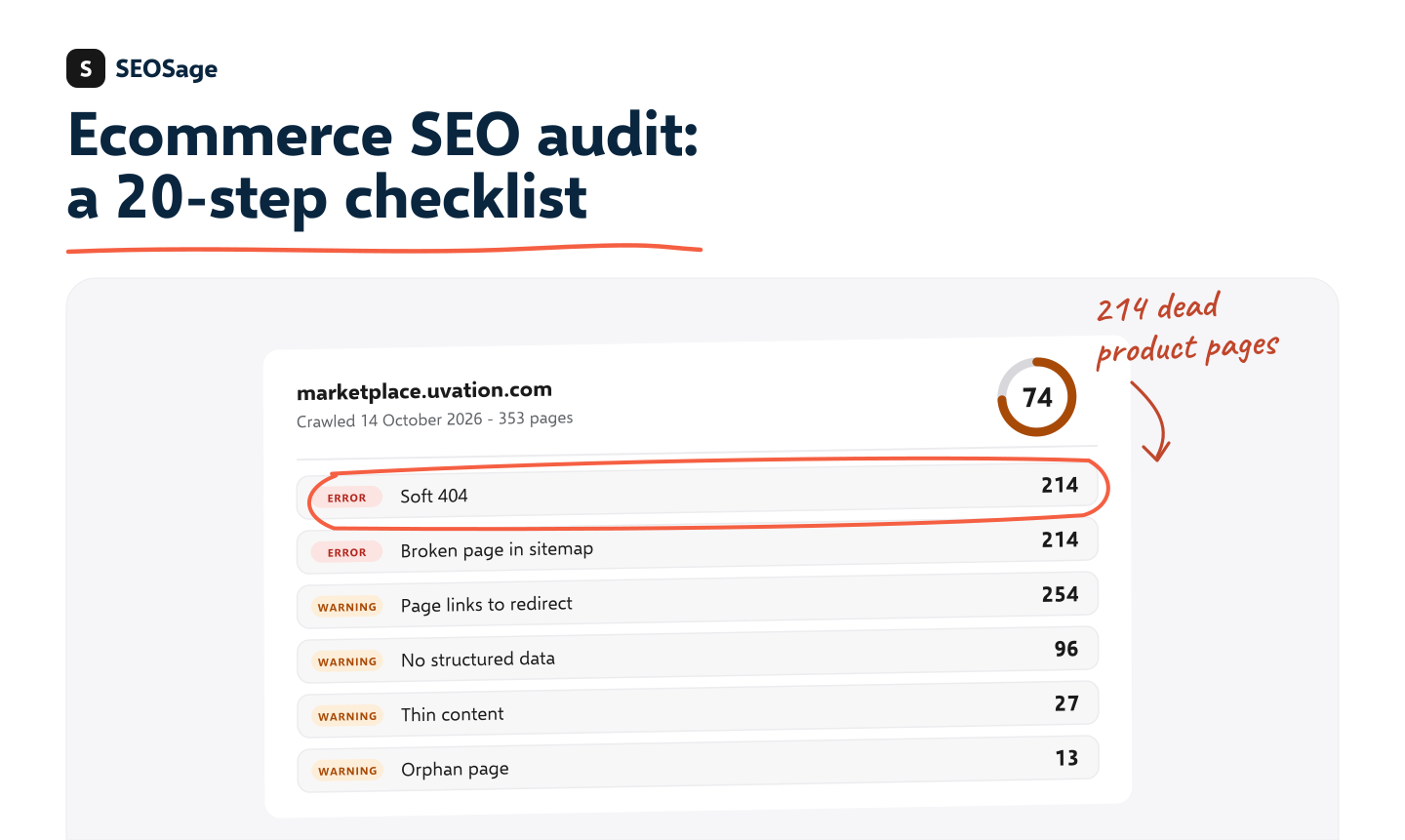
It is written by the maker of SEOSage, an SEO audit app that crawls a whole site on your own computer with no page limit. We say plainly where it helps and where you need another tool.
TL;DR
- Crawl every page of the store, not a sample. Stores hide their biggest problems in the long tail of filter and variant URLs.
- Work through five groups: crawling and indexing, duplicate URLs, structure and links, page content, and rich results and speed.
- Fix category pages and best sellers first. They bring the visits and the sales.
- Crawl again after each round of fixes and compare, so you can show what changed.
- One SEOSage crawl finds the evidence for most of steps 1 to 18. Steps 19 and 20 use its schema and speed checks.
What is an ecommerce SEO audit? #
An ecommerce SEO audit is a check of an online store’s technical setup, page content and site structure against what search engines need. You crawl the site, list what is wrong, rank the problems by how much they cost you, and fix them in that order.
The steps are the same as in a general SEO audit checklist. What changes is where the problems hide and which ones matter most. If you sell software rather than products, use the SaaS SEO audit checklist instead.
How is an ecommerce SEO audit different from a normal SEO audit? #
A store has far more pages, more duplicate URLs and more pages that vanish, so problems hide in the long tail and a sample crawl misses them.
| Blog or brochure site | Online store | |
|---|---|---|
| Number of pages | Tens to hundreds | Thousands to millions |
| Duplicate URLs | Rare | Common: filters, sorting, variants, tracking tags |
| Pages that disappear | Seldom | Every time a product sells out or is discontinued |
| Page copy | Written for the page | Often copied from the maker, so many shops share it |
| Structured data | Article, FAQ | Product, price, stock, reviews |
| Cost of a mistake | Lost reading | Lost sales |
That is why a sample crawl is not enough. If a tool stops at 500 pages, it never reaches most of a store.
Before you start #
- Get a full crawl. Use a crawler with no page limit, or one that can handle your store’s size.
- List your money pages. Note the top categories and best sellers. Check Search Console for the pages that already get clicks. SEOSage’s quick wins view lists searches where you already rank 4 to 10.
- Save the first crawl. You will compare against it later to show progress.
- Know your platform. Shopify, WooCommerce, Magento and BigCommerce each create their own URL patterns. Look at a few before you start.
The 20-step ecommerce SEO audit checklist #
Group 1: Can search engines reach your store? #
1. Crawl the whole store
Start the crawl from the home page and let it follow every link. Check the total against what you expect: if the crawl finds 40,000 URLs and you sell 3,000 products, you have a duplicate URL problem to fix in Group 2.
2. Check robots.txt
Make sure it does not block category pages, product pages, images, or the CSS and scripts that draw the page. It is fine to block the cart, the checkout and internal search results. Test any rule you are unsure about with the free robots.txt tester.
3. Check the XML sitemap
The sitemap should list only the pages you want in search: live, indexable products and categories. Remove redirected, broken and noindex pages from it, and make sure new products are added. The sitemap checker flags bad entries.
4. Check noindex tags
Look for two mistakes: important pages marked noindex by accident (a common leftover from a site launch), and thin pages that should be noindex but are not, such as account pages, wish lists and internal search results. The noindex checker tests a page quickly.
5. Fix broken links and 404 pages
Products disappear. Decide what each missing page should do:
- Back soon: keep the page live and say so.
- Replaced by a similar product: redirect it to that product.
- Gone for good: redirect to the closest category, or return a 404 or 410 page that links to related products.
Google calls a page that says “not found” but still answers as normal a soft 404, and advises a proper error or a redirect instead. Then update every link that still points at the old address. Use the 404 checker for a single page, or a crawl to find them all.
6. Clean up redirect chains
A redirect that leads to another redirect wastes crawl time and slows the page. Link straight to the final address. Platform migrations and removed products leave long chains behind. Check one with the redirect chain checker.
Group 2: Are duplicate URLs under control? #
7. Control faceted navigation and filters
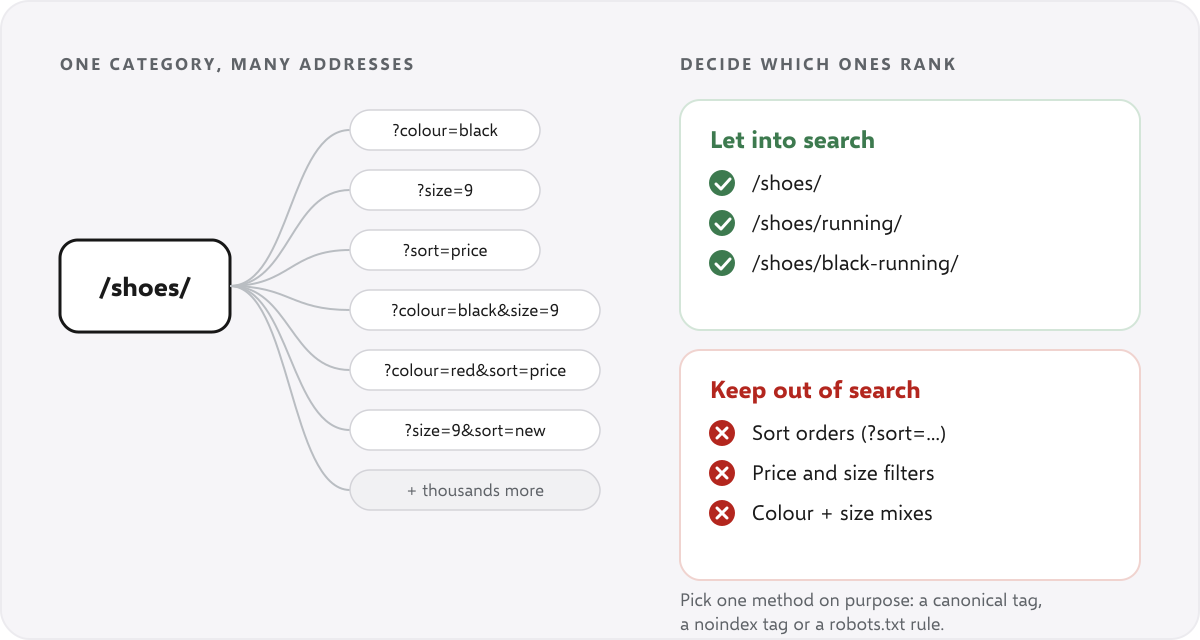
Filters for colour, size, brand and price can turn one category into thousands of addresses, most of them near-copies of each other. Decide which filtered pages deserve to rank, such as “black running shoes”, and keep the rest out of the index. Pick one method for the rest: a canonical tag pointing to the main category, a noindex tag, or a robots.txt rule that stops crawlers wasting time on them. Google’s guide to managing faceted navigation explains the options and their trade-offs.
8. Check canonical tags
Every indexable page should point to the one address you want in search. Common faults on stores: a canonical that points to a redirected page, a canonical on a product variant that points to a different product, and pages that are both noindex and canonical to another page. See our canonical tag checker for what to look for, and Google’s page on consolidating duplicate URLs for how canonicals are treated.
9. Check pagination
Category pages with page 2, 3 and 4 need clear links between them. Do not point every page’s canonical at page 1, because that hides the products on later pages. Make sure products on deep pages can still be reached by a link. Google’s advice on pagination and incremental page loading covers numbered pages and “load more” buttons.
10. Decide how to handle product variants
If a shirt comes in six colours, choose one approach: one page with a variant picker, or a separate page per colour that has its own content and a self-referencing canonical. Do not leave six near-identical pages that compete with each other. SEOSage can show where your own pages compete for the same searches, using your Search Console data.
Group 3: Is the structure clear? #
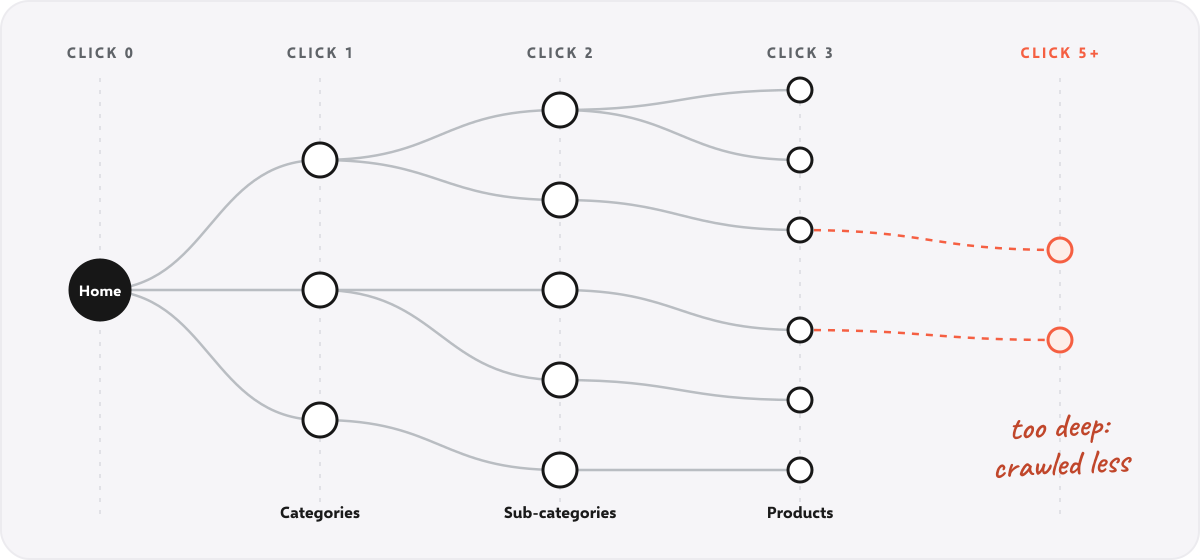
11. Keep important pages close to the home page
Shoppers and crawlers should reach your best categories and products in about three clicks. Pages buried deeper get crawled less and are seen as less important. SEOSage’s link strength check flags pages that sit five or more clicks from the home page.
12. Find orphan pages
An orphan page is a product or category that no other page links to. It is hard to find and gets no link value from the rest of the store. Stores create them when a category is rearranged or a product is added by hand. SEOSage lists orphan pages in each crawl and suggests which pages should link to them.
13. Link categories, products and related items
Each category should link to its best products. Each product should link back to its category and to a few related products. Add breadcrumbs so the path is clear to shoppers and search engines. Google’s guide to helping Google understand your ecommerce site structure covers the same ground. Use plain descriptive link text, not “click here”. The internal linking tool suggests pages that should link to each other.
14. Check URL structure
Product and category addresses should be short, readable and stable. Avoid session IDs, long strings of numbers and addresses that change when a product moves category. Changing a live address means a redirect, so choose a pattern and keep it. Google has its own advice on designing a URL structure for ecommerce sites. The URL structure checker flags awkward addresses.
Group 4: Do the pages say what they are? #
15. Write unique titles and descriptions
Every category and product page needs its own title tag and meta description. Stores often leave the platform default, which repeats the same title across hundreds of pages. Put the product or category name first, add a useful detail such as the type, size or a reason to click, and keep titles short enough not to be cut off. The meta description checker shows how a description will look.
16. Add real content to category pages
A category page that is only a grid of products gives search engines little to go on. Add a clear heading, a short introduction that explains what the category is and how to choose, and links to the main sub-categories. Keep it short and useful, and put it where shoppers will see it, not buried under the products.
17. Rewrite thin or copied product descriptions
If you paste the maker’s description, the same words appear on every other shop that sells the product. Start with your best sellers. Say who the product is for, what makes it different, what size or fit to choose, and what customers ask before they buy. Flag pages with very little text in your crawl and work through them in order of sales.
18. Fix product images
Check that every product image has a descriptive alt text, a sensible file name and a small file size. Large images are one of the most common reasons a product page is slow. Use WebP or AVIF where your platform supports them. The alt text checker finds missing text on a page.
Group 5: Can you earn rich results, and is it fast? #
19. Add and test Product structured data
Product markup tells Google the name, image, price, currency, availability and reviews of a product, which can earn price and star ratings in results. Check that the price in the markup matches the price on the page, and that out-of-stock items say so. Google lists the fields it reads in its Product structured data guide. Test a sample of product and category pages with the free schema markup validator. To compare prices or stock text across the whole store, custom extraction can pull them from every page.
20. Check speed and mobile on your main templates
Most shoppers use a phone: Statista estimates that mobile made up 60 percent of global e-commerce sales in 2023. Test one home page, one category page and one product page, because every product shares one template and one fix helps them all. Google’s targets are a main image that loads in 2.5 seconds or less, a page that responds within 200 milliseconds, and almost no shifting. Google explains the Core Web Vitals in full, and you can see how they are checked in SEOSage.
If you sell in more than one country #
Stores with a version for each country or language need hreflang tags, so the right version shows in each place. Each page must point to its alternates and each alternate must point back. Check a page with the hreflang checker.
What does an ecommerce SEO audit find on a real store? #
On a real crawl, the biggest finding is usually dead product pages. We crawled the Uvation Marketplace site (353 pages) with SEOSage on 14 October 2026. 214 pages answered as normal pages while saying “not found”, and the sitemap listed 214 addresses that return an error.
The dead pages were old product versions, such as colour options of an Apple HomePod mini and Samsung Galaxy Buds. The site had removed the products but not the pages or the sitemap entries. The crawl scored 74 out of 100. These are the main findings and the checklist step each one belongs to:
| What the crawl found | Pages | Checklist step |
|---|---|---|
| Soft 404: the page says “not found” but answers as if it exists | 214 | 5. Fix broken links and 404 pages |
| Broken addresses listed in the sitemap | 214 | 3. Check the XML sitemap |
| Pages that link to an address that redirects | 254 | 6. Clean up redirect chains |
| Pages with no structured data | 96 | 19. Add and test Product structured data |
| Missing meta description | 32 | 15. Write unique titles and descriptions |
| Thin content | 27 | 17. Rewrite thin or copied product descriptions |
| Same page title on several pages | 16 | 15. Write unique titles and descriptions |
| Orphan pages, including server category pages | 13 | 12. Find orphan pages |
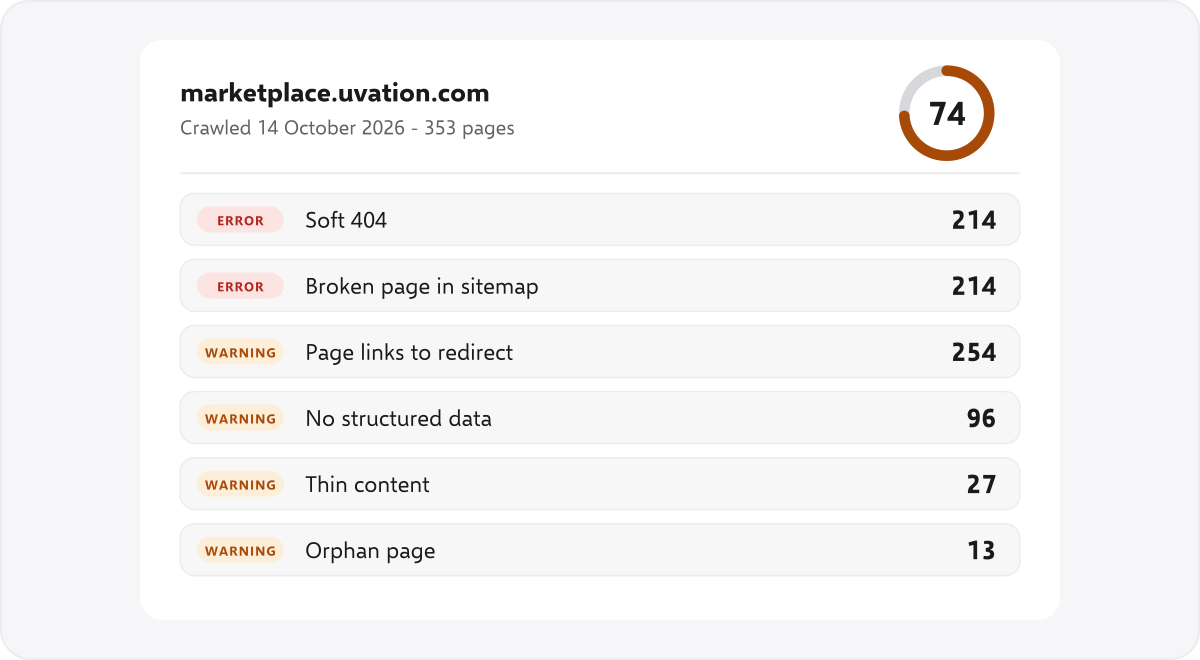
Notice the order. The first two rows are one problem seen twice, and fixing it clears 214 errors in one go. Restore each page or redirect it to the closest current product, then remove the dead addresses from the sitemap. A long list of small issues, such as titles that are slightly too long, can wait. This is what ranking by impact looks like.
How do you run an ecommerce SEO audit in SEOSage? #
Add the store, crawl it with no page limit, work through the Issues page, fix, then crawl again and compare.
SEOSage is a desktop app for Mac and Windows. It runs the crawl on your own computer, so there is no page limit and the size of the store is not a problem. The steps are short:
- Add the store as a project and start the crawl. Large stores take longer, but the crawl keeps going until it has followed every link.
- Open the Issues page. It lists problems by how serious they are: broken links, redirect chains, canonical and noindex faults, missing titles, thin pages, orphan pages and more, with a plain explanation of each.
- Add your own checks. Use custom extraction to pull prices, stock text or a tracking code from every page.
- Fix, then crawl again. The compare view shows what was fixed, what is new and what got worse.
- Send the client a branded report. Export a PDF, PowerPoint, Excel or CSV file with your own logo and colours. See our guide to the SEO client report.
Plans start at $9 a month and the free trial lasts 14 days. See the SEO crawler or white label SEO audit tool for the full list of checks.
What it does not do: it has no keyword or backlink database, and it does not read your store’s sales data. For speed on a real shopper’s phone, use Google’s own tools as well.
What should you fix first in an ecommerce SEO audit? #
Fix anything that blocks indexing on a category or best seller first, then broken links, duplicate URLs, page copy, and last structured data and speed.
A big store can show thousands of issues. Do not fix them in the order they appear. Rank them by how much money the page makes:
- Anything that blocks indexing on a category or a best seller: robots.txt rules, noindex tags, bad canonicals.
- Broken links and redirect chains on pages that get visits.
- Duplicate URLs from filters and variants, because they waste crawling on the whole store.
- Titles, descriptions and copy on the top 20 categories and top 50 products.
- Structured data and speed on the main templates.
- Everything else, in batches, after you have re-crawled.
How often should you run an ecommerce SEO audit? #
Audit once at the start and after any big change, then crawl monthly.
Do a full audit when you start, and again after any big change such as a new theme, a platform move or a rebuilt menu. After that, crawl once a month to catch new broken links and duplicate URLs before they pile up. A short monthly check is easier than a big yearly clean-up.
Common ecommerce SEO audit mistakes #
- Auditing a sample. The problem is usually in the part you did not crawl.
- Blocking filters in robots.txt and nothing else. Crawlers then cannot see the canonical or noindex tag on those pages. Pick the method on purpose.
- Redirecting every dead product to the home page. Send it to the closest category, or to a replacement.
- Noindexing paginated pages. The products on them can drop out of search.
- Fixing only what the tool lists first. Rank by revenue, not by count.
- Never re-crawling. Without a second crawl you cannot show that anything improved.
Summary #
An ecommerce SEO audit finds what stops search engines reaching and ranking your category and product pages. Crawl the whole store, work through the five groups in order, fix the pages that make you money first, and crawl again to prove the change. SEOSage runs that crawl on your own computer with no page limit and exports a branded report for clients.
FAQ #
What is an ecommerce SEO audit? #
It is a check of an online store’s technical setup, page content and structure, so search engines can find and rank its category and product pages. It ends with a ranked list of fixes.
How long does an ecommerce SEO audit take? #
The crawl takes minutes for a small store and a few hours for a very large one. Reading the results and ranking the fixes takes about a day for a mid-size store.
How much does an ecommerce SEO audit cost? #
Agencies charge anywhere from a few hundred to several thousand dollars, depending on the store’s size. If you do it yourself, SEOSage starts at $9 a month with a 14-day free trial.
Can I audit a Shopify or WooCommerce store? #
Yes. A crawler reads the public pages, so it works with any platform. Each platform has its own habits, such as Shopify’s duplicate product addresses under collections. The checklist above covers them.
What are the biggest ecommerce SEO problems? #
Duplicate URLs from filters and variants, thin or copied product copy, broken links to products that were removed, weak category pages and slow pages on the main templates.
Do I need a page limit-free crawler for a big store? #
Yes. A tool that stops at a few hundred or a few thousand pages will miss most of a large store. SEOSage has no page limit, because the crawl runs on your own computer.
Can I send the audit to a client? #
Yes. SEOSage exports branded PDF, PowerPoint, Excel and CSV files with your logo and colours. There is no client login. You send the file.