An SEO content audit is a review of every page on a website to decide what to keep, improve, merge or remove, based on what each page does for search. A crawl lists the pages, Google Search Console shows which ones bring visits, and you make one decision per page. This guide gives you six steps, a real example from a crawl and a free spreadsheet template.
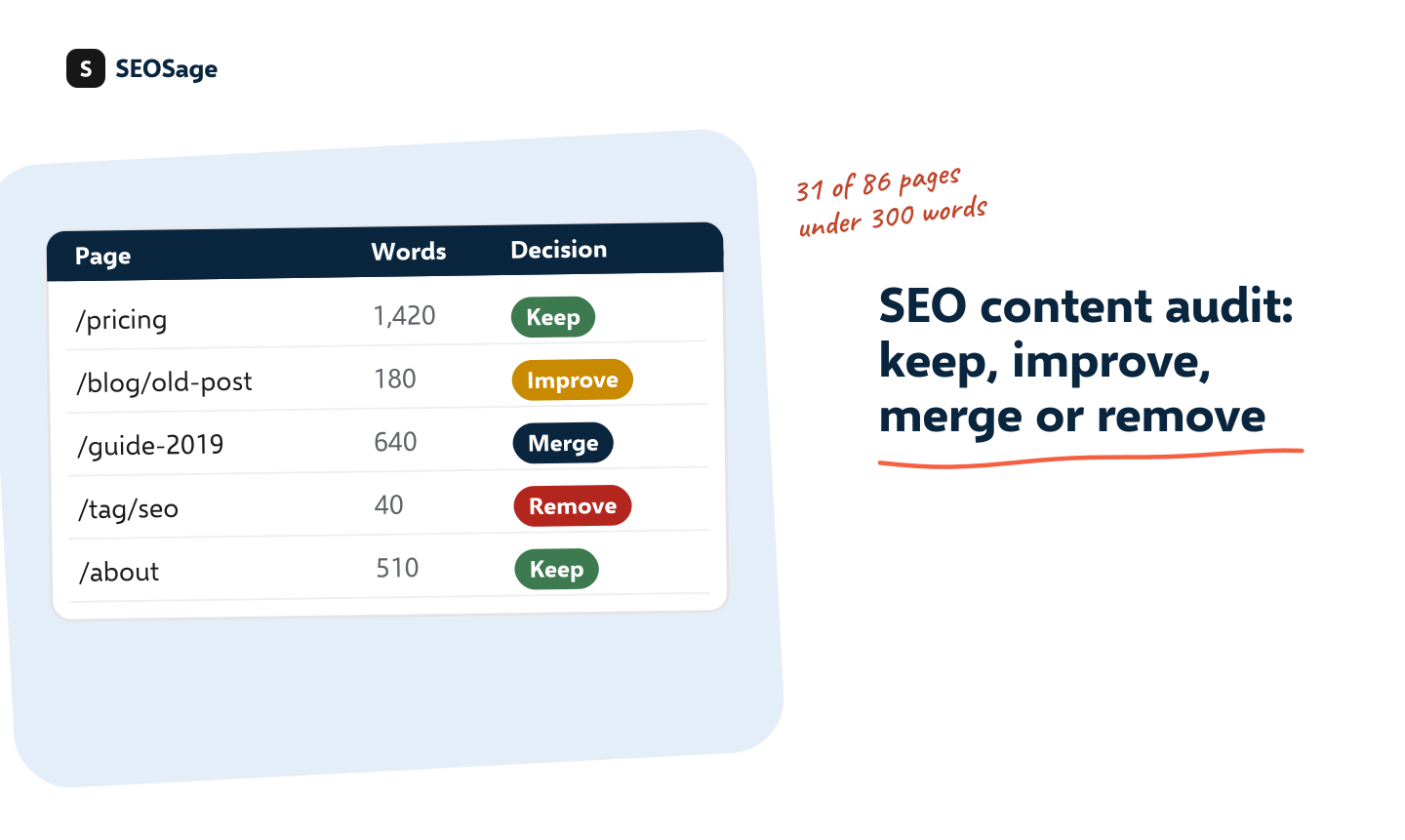
Download the free content audit template (Excel) · It works in Excel, Google Sheets and Numbers. No sign-up and no email form.
It is written by the maker of SEOSage, an SEO audit app that crawls a whole site on your own computer, so the example comes from a real crawl.
TL;DR
- A content audit gives every page one decision: keep, improve, merge, redirect, remove or noindex.
- Use a crawl for the list and word counts, and Search Console for clicks and impressions. Word count flags a page, but it does not decide for you.
- Work in six steps: list the pages, add the numbers, flag the problems, decide, do the work, crawl again.
- Start with pages that already get visits. They are the cheapest to improve.
- A content audit is not a technical SEO audit. It asks “is this page worth having?”, not “is this page broken?”.
What is an SEO content audit? #
An SEO content audit is a page-by-page review of a site’s content, to decide which pages help search performance and which hold it back. The output is not a list of faults. It is a list of decisions.
It overlaps with the SEO audit, but the question is different. A technical audit asks whether pages work: can Google reach them, do they load, are they linked? A content audit asks whether pages deserve to exist: do they match a search, say something useful and avoid repeating each other?
Why run an SEO content audit? #
- Thin pages with a few lines of text give search engines little reason to show them.
- Duplicate and near-duplicate pages compete with each other and split the credit between them.
- Old pages that are out of date can mislead visitors and drag down a site’s overall quality.
- Missed chances. Pages that already rank just below the top often need only a small improvement.
Google’s own guidance asks site owners to create helpful, reliable, people-first content. A content audit is how you check a whole site against that, one page at a time.
How do you do an SEO content audit? #
An SEO content audit takes six steps. The first three collect facts. The last three act on them.
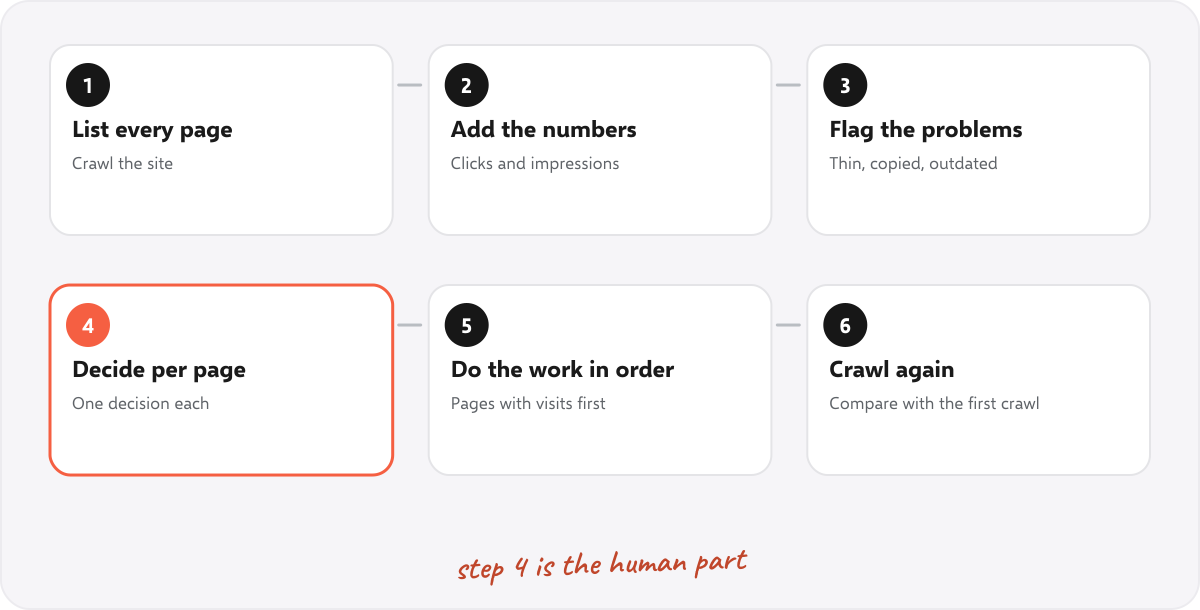
Step 1: List every page #
Crawl the site and export one row per page: the address, the title and the word count. A crawler finds pages that a sitemap misses, so you see the whole site. In SEOSage, the crawl has no page limit and exports the list as a CSV. Paste it into the Content audit sheet of the template.
Step 2: Add the numbers #
Add clicks, impressions and average position for each page from Google Search Console, for the last three to twelve months. Pages with no impressions at all are the first candidates for a decision. SEOSage can also show Search Console data next to your crawl.
Step 3: Flag the problems #
Mark the pages with a known problem. A crawl does most of this for you:
- Thin content: very little text on the page.
- Duplicate content: pages that share a title, description or heading.
- Missing or weak titles and headings: no H1, a title that is too short or too long.
- Cannibalization: two pages that appear for the same searches. SEOSage’s keyword cannibalization view finds them with your Search Console data.
- Quick wins: searches where a page already ranks 4 to 10. See quick wins.
Step 4: Decide, page by page #
Give every page one decision. Use the rules in the next section, and write the reason in the Why column so that someone else can understand it later.
Step 5: Do the work in order #
- Improve the pages that already get visits first. A small rewrite on a page near the top of results can bring more than a new page.
- Merge and redirect overlapping pages, using 301 redirects. Update internal links so that none points at a redirect.
- Remove the pages with no visits, no links and no purpose.
- Noindex the pages that must stay for visitors but do not belong in search.
Step 6: Crawl again and compare #
After the work, crawl again. The compare view shows what changed since the first crawl, so you can show a client or a boss what the audit achieved.
What does a content audit crawl look like? A real example #
We crawled marketingly.org with SEOSage on 29 September 2026. The crawl found 86 pages that loaded normally. Their word counts looked like this:
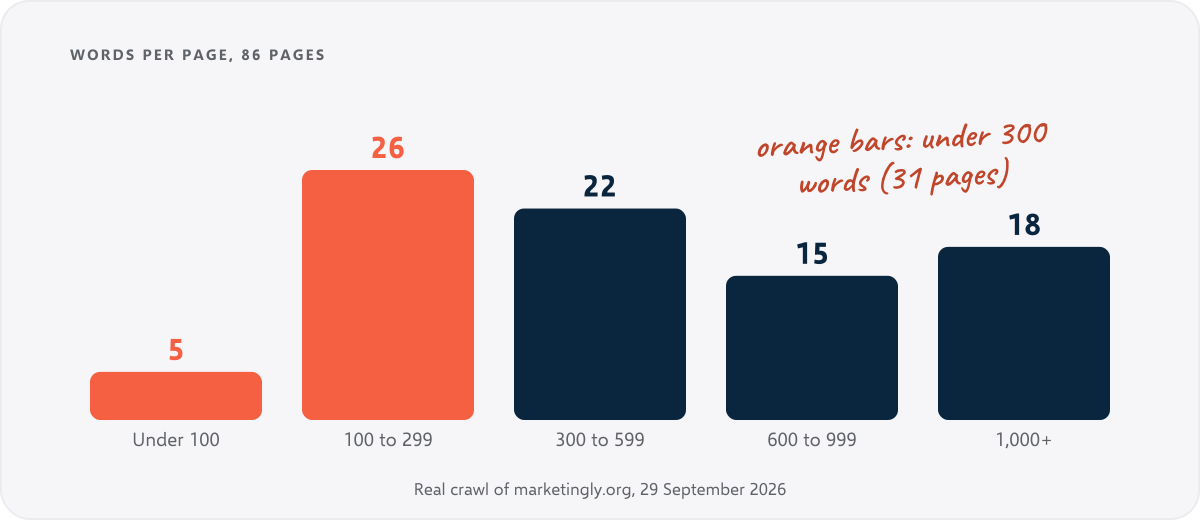
31 of the 86 pages had under 300 words, and 5 had under 100. SEOSage flagged 35 pages as thin content and 40 as sharing a title, description or heading with another page. 10 pages had no H1 heading and 27 had a title that was too short.
That is a list of flags. It is not yet a list of decisions. For example, the contact page has 261 words, which is under 300. That is fine: a contact page needs an address, a form and little else. Keep it. A services page with 130 words is a different story, because a visitor comparing agencies needs more to go on. Improve that one.
The lesson is that word count tells you where to look, not what to do. The decision needs the Search Console numbers and a person who knows what the page is for.
How do you decide to keep, improve, merge, redirect or remove a page? #
Ask three questions in order. Does the page get visits or links? Is it useful and up to date? Does another page already cover the same topic?
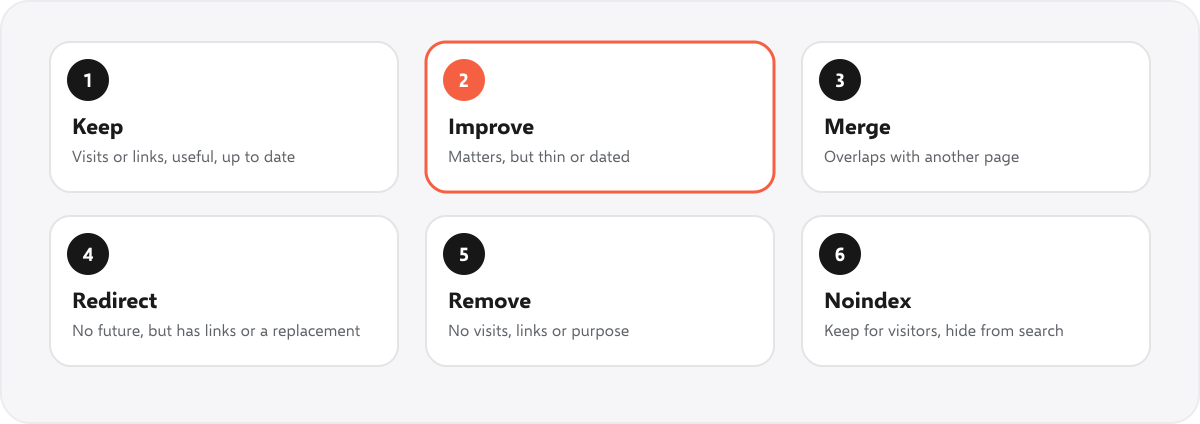
| Decision | Choose it when | What to do |
|---|---|---|
| Keep | It gets visits or links, matches a search and is up to date | Leave it. Check once a year. |
| Improve | It matters, but it is thin, dated or ranks just below the top | Rewrite or extend it. Fix the title, heading and internal links. |
| Merge | Two or more pages cover the same topic and compete | Combine the best of each into one, and redirect the rest to it. |
| Redirect | The page has no future, but another page covers the topic or it has links | 301 redirect it to the closest useful page. |
| Remove | No visits, no links, no purpose and no good replacement | Delete it and return 404 or 410. Take it out of the sitemap. |
| Noindex | It must stay for visitors but not appear in search | Add a noindex tag. Do not also block it in robots.txt. |
When two pages overlap, Google’s guide to consolidating duplicate URLs explains how redirects and canonical tags help it choose the right one.
Is there a free SEO content audit template? #
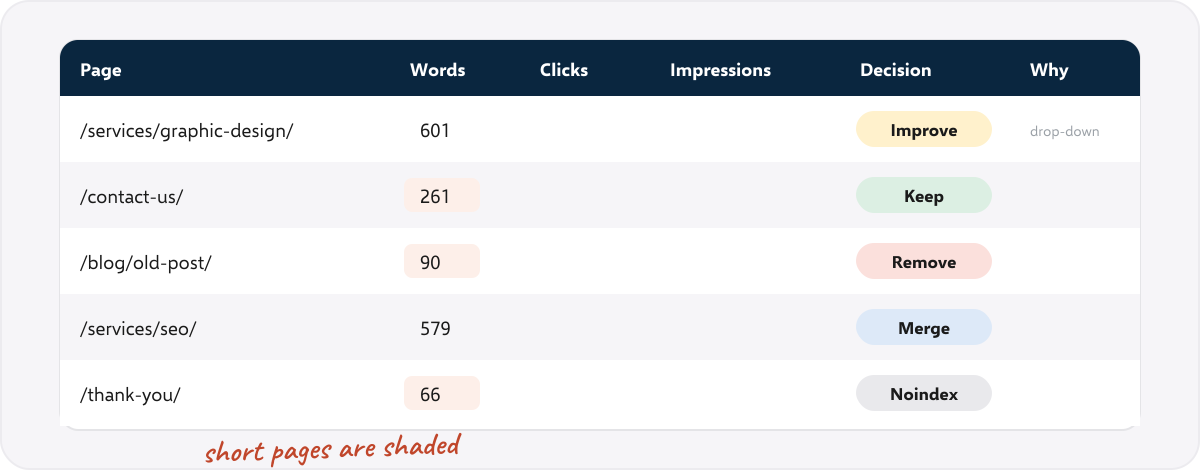
Yes. Our free content audit template is a spreadsheet with four sheets. There is no sign-up and no email form.
- Start here: the six steps in plain words.
- Content audit: one row per page, with columns for the address, title, word count, clicks, impressions, position, decision, reason, owner, due date and done. The decision is a drop-down that colours the cell, and short pages are shaded.
- Decision rules: when to choose each decision, and what to do.
- Summary: a count of pages by decision, and how many are done.
It has room for 500 pages. For a bigger site, filter the list down to the sections you are auditing first.
Which numbers should you use? #
| Number | Where it comes from | What it tells you |
|---|---|---|
| Word count | A crawl | Where to look for thin pages. Not a verdict. |
| Clicks and impressions | Search Console | Whether the page earns any attention from search |
| Average position | Search Console | Whether a small improvement could move it onto page one |
| Links to the page | A crawl (internal) or a backlink tool (external) | Whether removing it would waste link value |
| Last updated | The page or the CMS | Whether the content may be out of date |
| Conversions | Your analytics | Whether the page helps the business, even if it gets few visits |
SEOSage does not have a backlink database. If you need external links per page, use a backlink tool for that column. A crawl still shows how many of your own pages link to each page.
How do you run a content audit in SEOSage? #
- Crawl the site and open the Issues page. Look at thin content, duplicate content, missing headings and titles.
- Export the page list and paste it into the template.
- Connect Search Console to see clicks and impressions for each page, and use the quick wins and cannibalization views.
- Use the template to record each decision.
- Crawl again after the work and use the compare view.
Plans start at $9 a month and the free trial lasts 14 days. To give a client the result, export a branded report. See the white label SEO audit tool.
How often should you run a content audit? #
Run a full content audit once a year for most sites, and when you take over a site, after a redesign, or when traffic drops. Between audits, crawl monthly and look at the new thin or duplicate pages so they do not pile up.
Common content audit mistakes #
- Deleting pages because they are short. Check the visits and the purpose first.
- Deleting without redirects. A page with links needs a 301 to a replacement, or the link value is lost.
- Auditing without Search Console data. Without it you are guessing which pages matter.
- Changing too much at once. Do it in batches, and crawl between batches so you can see what worked.
- Not recording the reason. In six months nobody will remember why a page was removed.
Summary #
An SEO content audit gives every page one decision: keep, improve, merge, redirect, remove or noindex. A crawl lists the pages and flags the thin and duplicate ones. Search Console shows which pages matter. You decide, do the work in order, and crawl again to prove the change. Use the free template to keep the decisions in one place.
FAQ #
What is an SEO content audit? #
It is a review of every page on a site to decide which to keep, improve, merge, redirect or remove, based on how each page performs in search.
How do you do an SEO content audit? #
List every page with a crawl, add clicks and impressions from Search Console, flag the problems, decide for each page, do the work, then crawl again. The six steps above explain each one.
What is the difference between a content audit and an SEO audit? #
An SEO audit checks whether pages work technically. A content audit checks whether pages are worth having. Most projects need both. See what an SEO audit is.
How long does a content audit take? #
The crawl takes minutes. The decisions take the time, because each page needs a look. Filter to the pages that matter first.
How many pages should I delete? #
There is no right number. Delete a page only if it has no visits, no links and no purpose. Merge or redirect it if another page covers the topic.
Is a low word count always bad? #
No. A contact page, a thank-you page or a simple tool page can be short. Low word count is a flag to look at the page, not a verdict.
Do I need Search Console for a content audit? #
It is very much worth having. Without it you cannot tell which pages get visits, so you cannot rank your decisions. It is free.
Is the template really free? #
Yes. There is no sign-up and no email form. Edit it and reuse it for every client.