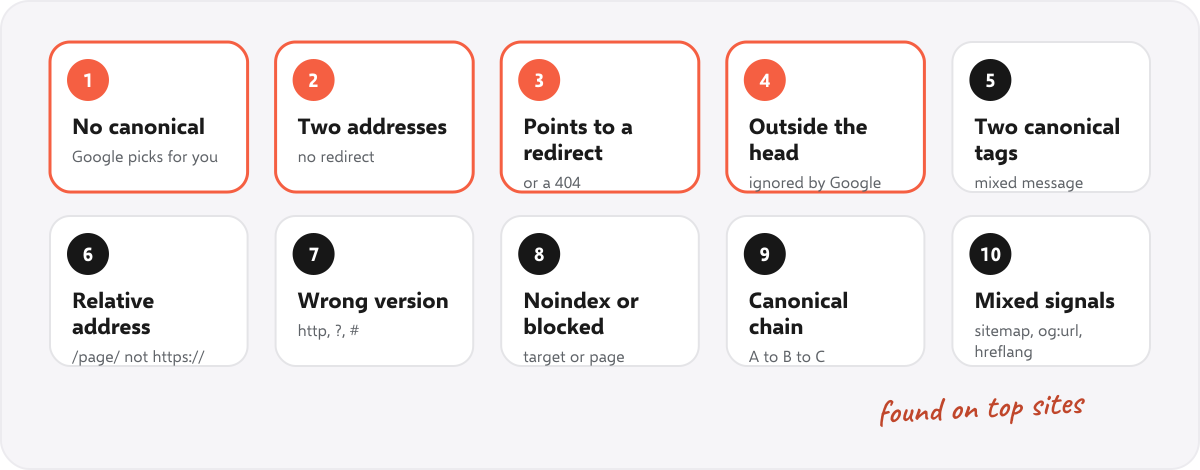
A canonical tag issue is any problem with the rel="canonical" tag that tells Google which address is the main version of a page: a missing tag, a tag that points to the wrong page, or a tag Google cannot read. Google treats the canonical as a strong hint, not an order, so when the tag and your other signals disagree, Google may pick a different page to show in search. Below are the 10 problems that cause it, how to find and fix each one, and how often we found them on the home pages of 177 popular websites.
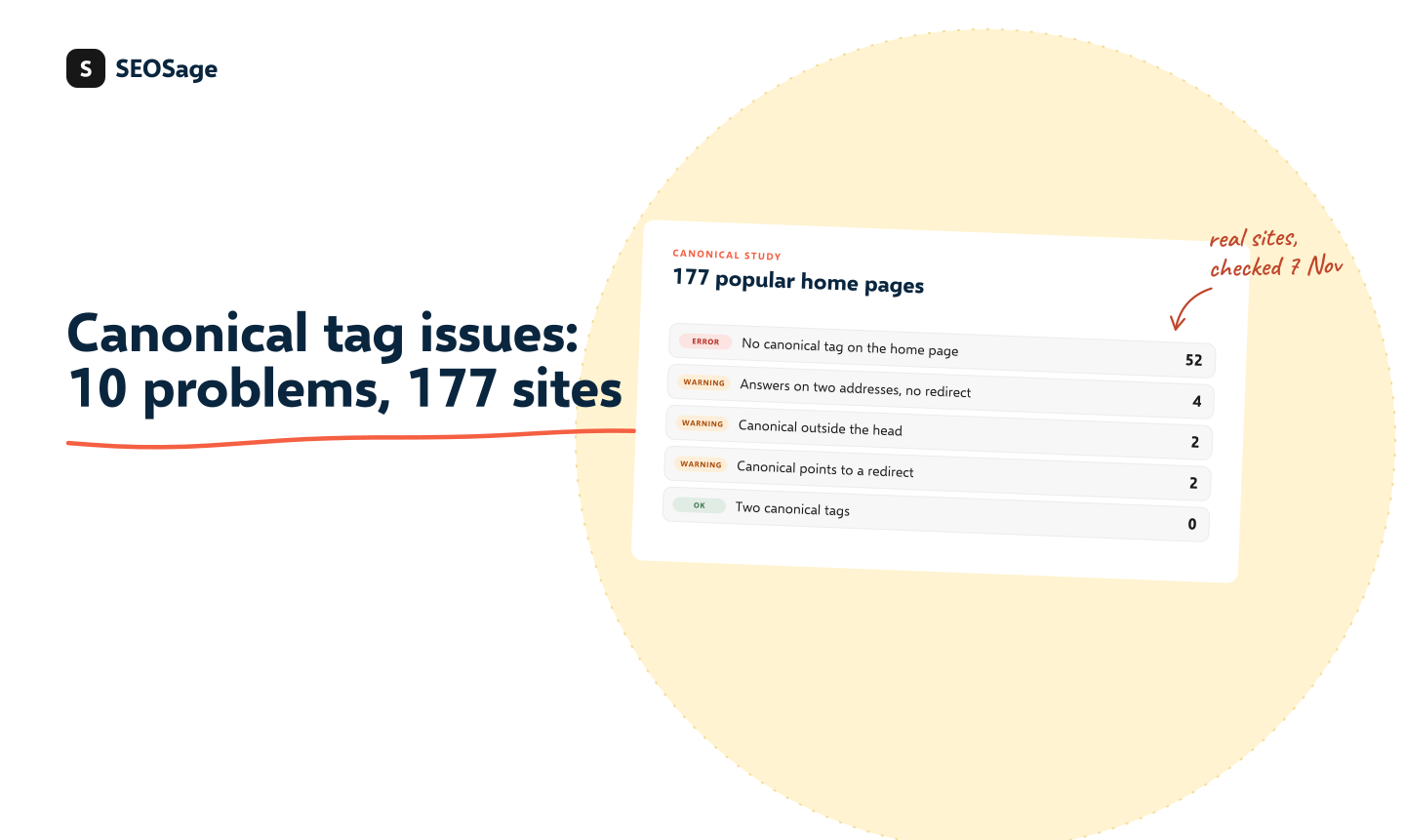
It is written by the maker of SEOSage, an SEO audit app that checks every canonical on a site. The study is our own: on 7 November 2026 we loaded the home page of 177 of the most visited websites, one per brand, and read their canonical tags. The method and the numbers are below.
TL;DR
- A canonical tag goes in the head of a page and names the one address you want Google to show:
<link rel="canonical" href="https://www.example.com/page/">.- The most common problem is no canonical at all: 52 of 177 popular home pages (29%) had none.
- Next: a page that loads on two addresses (with and without www) and relies on the canonical instead of a redirect (4 sites), a tag outside the head, where Google does not accept it (2 sites), and a canonical that points to an address that redirects (2 sites).
- Two canonical tags on one page, relative addresses and http canonicals were not found on any of the 177 sites. They are mostly a problem on smaller sites, themes and plugins.
- Check any page with the free noindex checker, which shows its canonical, and compare it with the “Google-selected canonical” in Search Console’s URL Inspection.
This guide is part of our series on how to do an SEO audit. Keep your findings in the free SEO audit template.
What is a canonical tag issue? #
When the same or very similar content can be reached at several addresses, Google groups them and picks one to show in search. That one is the canonical. You can suggest which it should be with a canonical tag, a redirect, or by listing it in your sitemap. A canonical tag issue is anything that makes that suggestion missing, unreadable or contradicted by your other signals.
The result is usually not a penalty. It is Google showing the version you did not choose, splitting links between two versions, or spending crawl time on copies. Google explains how it picks a canonical in its guide to canonicalization.
How to check a canonical tag #
- One page: open it in our free noindex checker, which shows the canonical, or view the page source and search for
rel="canonical". - What Google chose: in Google Search Console, inspect the address with URL Inspection. It shows the “User-declared canonical” (yours) and the “Google-selected canonical”. If they differ, Google did not follow your tag. Search Console’s Page indexing report also lists pages as “Duplicate, Google chose different canonical than user”, explained in our Page indexing statuses guide.
- The whole site: a crawler reads every canonical and follows each one. SEOSage’s canonical check lists chains, canonicals to noindex pages, pages with several canonicals and tags outside the head.
The 10 canonical tag issues #
1. No canonical tag #
What it is: the page has no canonical tag and no canonical in its HTTP header.
Why it matters: Google says a canonical is “generally not critical”, and it will pick one on its own. But every page can be reached with extra parameters (?utm_source=, ?ref=, sorting and filters), and without a canonical Google has to guess which copy is the main one. Google recommends a self-referencing canonical, meaning each page names its own address.
How common: 52 of the 177 home pages (29%) had no canonical. Many were search engines, web apps and portals whose home page is not meant to rank on its own, but the share is still high for sites of that size.
Fix: add <link rel="canonical" href="https://www.example.com/page/"> to the head of every page that should be indexed, with the page’s own full address. WordPress adds one to posts and pages on its own, and SEO plugins add it to the rest.
2. The page loads on two addresses with no redirect #
What it is: example.com and www.example.com (or http and https, or a page with and without the last slash) both return the page, and only the canonical says which is the main one.
Why it matters: the canonical is a hint. A redirect sends people, links and Google to one address. Google’s own advice for a page that can be reached in several ways is to pick one address and “use redirects to send traffic from the other URLs to your preferred URL”.
How common: 4 of the 177 sites answered on the address without www, with status 200, and used a canonical pointing to the www address instead of a redirect: deepseek.com, hellotalk8.com, publicnode.com and weplayapp.com.
Fix: add a permanent (301) redirect from every other version to the main one. Test with our free redirect chain checker.
3. The canonical points to a redirect or an error #
What it is: the address in the canonical does not return 200. It redirects somewhere else, or returns 404 or another error.
Why it matters: you are telling Google that the main version is a page that is not there. Google then has to choose between your page, the canonical and wherever it redirects to.
How common: 2 of the 177. On VK’s two domains, our checker was sent to the mobile site (m.vk.com and m.vk.ru), whose canonical named the main domain, which redirected straight back to the mobile site. No canonical on the 177 pointed to a 404.
Fix: point every canonical at the final address, the one that returns 200. Re-check canonicals after any site move or change of URLs. Our site migration checklist includes this step.
4. The canonical is outside the head #
What it is: the canonical tag sits in the body of the page, or the head is broken so the browser closes it early, which pushes the tag into the body.
Why it matters: Google says the canonical link “is only accepted if it appears in the <head> section of the HTML”, so make sure at least the head is valid. A stray tag, an image or a script that writes content near the top of the head can close it early.
How common: 2 of the 177: nubank.com.br and toss.im, both with the canonical after the start of the body.
Fix: move the tag into the head, as high as you can. If a script adds the canonical, make sure it puts it in the head, as Google explains for JavaScript sites.
5. Multiple canonical tags on one page #
What it is: the page has two or more canonical tags, often because the theme adds one and an SEO plugin adds another, or a canonical in the HTML and a different one in the HTTP header.
Why it matters: if they point to different addresses, you are giving Google two answers to one question. Google’s guide says not to “specify different URLs as canonical for the same page using different canonicalization techniques”. Even if both tags point to the same address, it is a sign that two parts of the site are fighting over the head.
How common: none of the 177 home pages had more than one canonical tag, and the one site with a canonical in its HTTP header had no other. The usual cause is a theme and a plugin that both add a canonical, which large sites with their own templates rarely have.
Fix: view the page source and search for canonical. Keep one tag, and turn off the canonical setting in whichever plugin or theme added the extra one. In WordPress, run one SEO plugin only.
6. A relative address instead of a full one #
What it is: href="/page/" instead of href="https://www.example.com/page/".
Why it matters: Google supports relative canonicals but advises full addresses, because a relative one can point a test or copied version of your site at itself. A full address cannot be misread.
How common: 0 of the 177.
Fix: write the full address, with https and your main domain.
7. The canonical names the wrong version: http, a parameter or a # #
What it is: the canonical points to the http version of an https page, includes tracking or session parameters, or ends in a # part.
Why it matters: Google prefers https pages as canonical, and says not to use a URL fragment as the canonical, because it generally does not support them. A canonical with a parameter makes the copy the main version.
How common: 0 of the 177 had an http canonical, a parameter or a # in it.
Fix: the canonical should be the clean https address with no tracking parameters and no #.
8. Canonical plus noindex, or a canonical to a blocked page #
What it is: the page has a noindex tag and a canonical to another page, or the canonical points to a page that has noindex or is blocked in robots.txt.
Why it matters: a canonical asks Google to index the target, and noindex asks it not to index a page. Google does not recommend noindex as a way to choose a canonical within a site, because it blocks the page from search completely. A target blocked in robots.txt cannot be read at all.
How common: 1 of the 177: on hellotalk8.com, the home page without www had a noindex tag and a canonical to the www address. (We did not check robots.txt for every target.)
Fix: use one signal. For a duplicate, use a redirect or a canonical, not noindex. Make sure every canonical target is indexable and allowed in robots.txt. Test with the robots.txt tester.
9. Canonical chains #
What it is: page A’s canonical points to page B, and page B’s canonical points to page C.
Why it matters: Google has to follow the chain and may stop early or pick a page in the middle.
How common: not measured: our study read one page per site. Chains show up in a full crawl, usually after pages are merged or moved twice.
Fix: point A straight at C, the final page.
10. Mixed signals: sitemap, internal links, og:url and hreflang #
What it is: the canonical says one address, but your sitemap lists another, your internal links point to another, or the Open Graph og:url tag names another.
Why it matters: Google uses all of these as signals. Its guide gives this exact example of what not to do: one URL in the sitemap and a different URL for the same page in the canonical. With hreflang, Google says to choose a canonical in the same language.
How common: 7 of the 125 home pages that had a canonical (6%) had an og:url that named a different address, such as a version with a language folder or tracking parameters. That only affects how links look when shared, but it shows how easily two parts of a page disagree.
Fix: list only canonical addresses in the sitemap (our free sitemap checker tests a sample), link to the canonical address in your menus and articles, and keep og:url the same as the canonical.
The study: canonical tags on 177 popular websites #
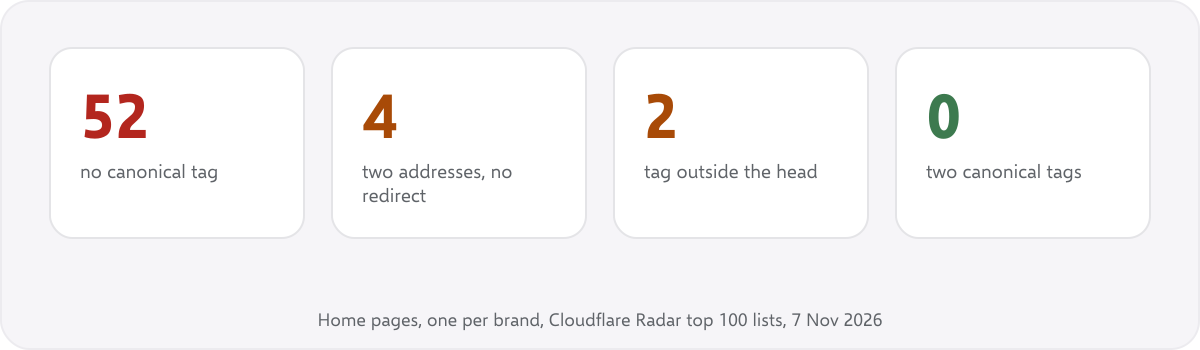
Method. On 7 November 2026 we took Cloudflare Radar’s lists of the 100 most visited domains worldwide and in 50 countries. That gave 610 domains. We removed 255 that are not websites people visit, such as content servers, trackers, ad servers and APIs. We then loaded the home page of each of the remaining 355 once, following redirects, with an honest user agent (SEOSageResearch/1.0). We kept the 242 pages that returned a normal web page (status 200, HTML, at least 3 KB), and counted each brand once (google.de and google.fr count as one), which left 177. For every canonical that pointed to a different address, we loaded that address too.
| What we found | Home pages | Share |
|---|---|---|
| Had a canonical tag | 125 | 71% |
| Canonical names the page itself | 111 | 63% |
| No canonical tag (problem 1) | 52 | 29% |
| Loads on two addresses, canonical instead of a redirect (2) | 4 | 2% |
| Canonical points to an address that redirects (3) | 2 | 1% |
| Canonical outside the head (4) | 2 | 1% |
| Noindex plus a canonical to another page (8) | 1 | 0.6% |
| og:url different from the canonical (10) | 7 | 4% |
| Two or more canonical tags (5) | 0 | 0% |
| Relative canonical (6) | 0 | 0% |
| http, parameter or # in the canonical (7) | 0 | 0% |
What it does not show. It is home pages only, of very large sites. Inner pages, such as product, category and blog pages, are where parameters, filters and plugins create most canonical problems, so the share there is likely to be different. 98 of the 355 sites did not answer our checker or blocked it (for example with a 403), so they are not counted. Some sites show a different page to different visitors, and we saw the version sent to our checker.
What stood out. The problems that break the tag outright (two tags, relative or http addresses) were not found at all. What we did find were problems of setup: no canonical, and a canonical used where a redirect should be. Those are easy to miss because the page looks fine in a browser.
How to fix canonical issues, in order #
- Redirect duplicate versions of the whole site (http, www, last slash) to one address. That removes most of the problem before canonicals come into it.
- Add a self-referencing canonical with the full https address to every page that should be indexed.
- Check that it is in the head, and that there is only one.
- Check that every canonical target returns 200, is indexable and is allowed in robots.txt, with no chains.
- Make the other signals agree: the sitemap, internal links,
og:urland hreflang. - Compare with Google: in Search Console, look for “Duplicate, Google chose different canonical than user” and inspect a few of those addresses.
How does SEOSage help find canonical issues? #
SEOSage is a desktop SEO audit app for Mac and Windows. It crawls every page of a site, with no page limit, reads each canonical and follows it. Its canonical check shows a canonical that points to a noindex page as an error; chains, several different canonicals, a # part and a tag outside the head as warnings; and a relative address as a notice. It also flags pages in the sitemap that are not canonical. It is free for 14 days.
Common mistakes when fixing canonicals #
- Using a canonical where a redirect belongs. If a page should not exist at an address, redirect it.
- Pointing every page at the home page. A canonical says “this page is a copy of that one”. Pages that are not copies should name themselves.
- Using robots.txt to block duplicates. Google cannot read a blocked page’s canonical, and may still index the address.
- Running two SEO plugins. Each adds its own canonical.
- Not checking after a change. A new theme, plugin or URL structure can change every canonical on the site at once.
Summary #
A canonical tag names the main address of a page. The 10 issues are: no canonical, a page on two addresses with no redirect, a canonical to a redirect or error, a tag outside the head, two canonical tags, a relative address, the wrong version (http, parameters or #), canonical plus noindex or a blocked target, chains, and signals that disagree. On the home pages of 177 popular websites, the common problems were a missing canonical (29%) and a canonical used instead of a redirect. Two canonical tags, relative and http canonicals were not found on any of them.
FAQ #
What is a canonical issue in SEO? #
A problem with the canonical tag, or with the signals around it, that leaves Google unsure which address is the main version of a page. Google may then show a version you did not choose.
What happens if a page has multiple canonical tags? #
If they point to different addresses, Google gets two answers and has to choose, and it may not choose the one you want. Keep one tag and remove the theme or plugin setting that added the other.
Does every page need a canonical tag? #
It is not required, but Google recommends a self-referencing canonical on each page you want indexed. It protects the page from copies made by parameters.
Is a canonical tag a directive? #
No. It is a strong hint. Google can choose a different canonical if your other signals, such as redirects, internal links and the sitemap, point elsewhere.
Should I use a canonical or a redirect? #
Use a redirect when only one version should exist, such as http and https, or www and without www. Use a canonical when both versions must stay, such as a page with a sorting parameter.
How do I see which canonical Google chose? #
Inspect the address in Google Search Console with URL Inspection. It shows both the canonical you declared and the one Google selected.
Sources #
- Google Search Central: How to specify a canonical URL with rel=”canonical” and other methods
- Google Search Central: What is URL canonicalization
- Google Search Central: Fix canonicalization issues
- Google Search Central: JavaScript SEO basics
- Cloudflare Radar: Top domains (the lists used for the study, 7 November 2026)
- IETF: RFC 6596, The Canonical Link Relation
Recommended #
- Search Console Page Indexing Report: Every Status Explained
- Technical SEO Audit Checklist: 25 Checks + Free PDF
- WordPress SEO Audit: 15 Checks We Ran on Our Own Site
- SEO Site Migration Checklist: 30 Steps + Free Redirect Map
- Duplicate Title Tags
- How to Do an SEO Audit: 12 Steps (With Free Tools)
- Broken Links and 404 Errors: How to Find and Fix Them
- Orphan Pages in SEO: How to Find and Fix Them
Run your own SEO audit
SEOSage crawls every page of your website, lists what is wrong and turns it into a report you can send to a client.