Features / White label SEO software
White label SEO software for agencies and freelancers
SEOSage is white label SEO software that runs on your own computer. Crawl a client's website, then send the audit as a report with your own logo, name and colours. Claude can write the summary. Plans from $9 a month, with no limit on pages or client sites.
Download SEOSage Download a sample report (PDF)
Free for 14 days. The sample report needs no sign-up. Jump to: See it · What it does · Kinds of tools · How to choose · Claude · Compare crawls · What is in the plan · Price · Questions
See white label SEO software in 38 seconds
White label SEO software that runs on your own computer: crawl any client site, send a deck, PDF and Excel file with your own name, and let Claude write the summary.
Read the video transcript
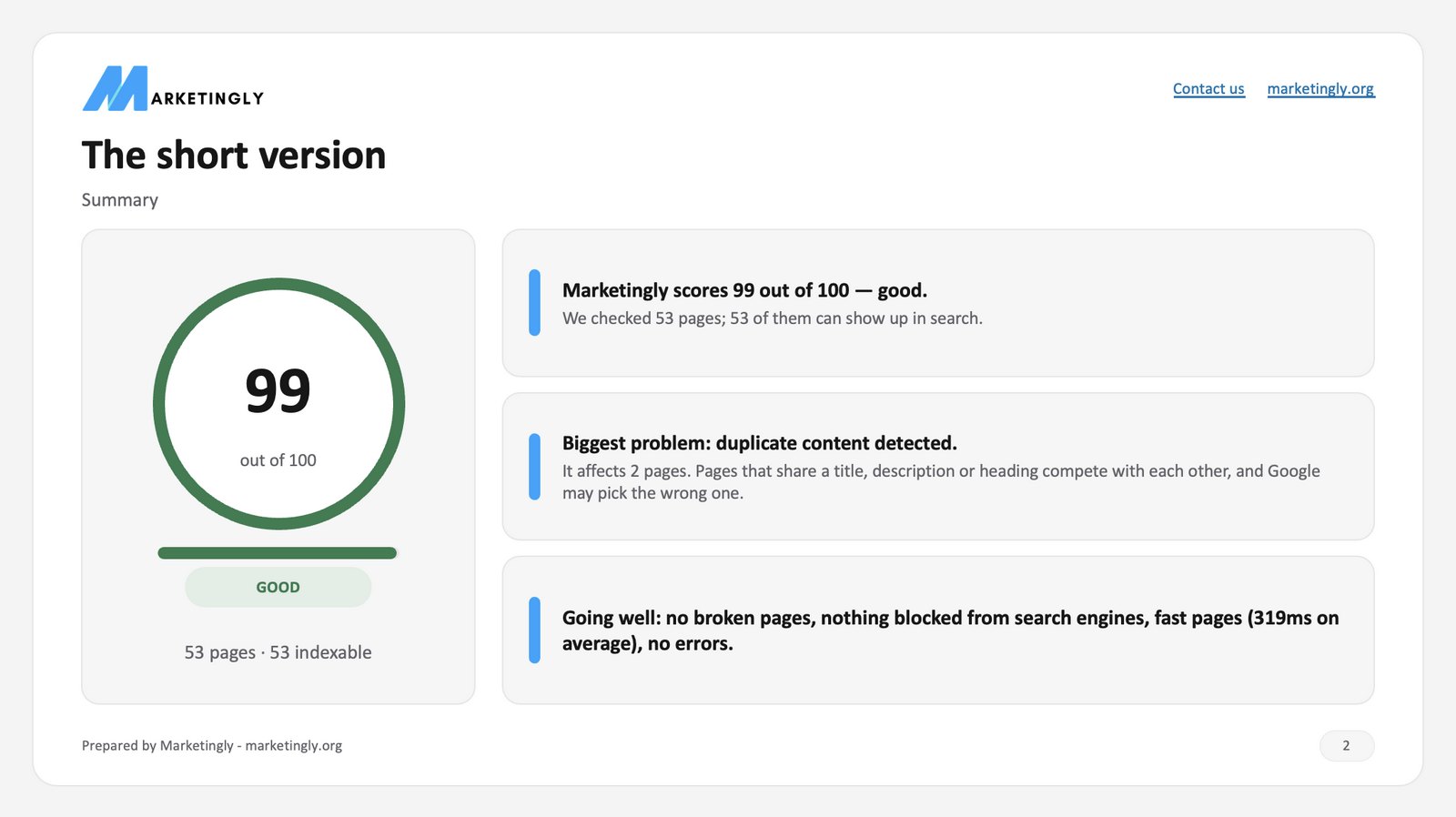
White label SEO software that runs on your own computer. Crawl any client site, every page, with no page limit. Add your logo, colour, and font once. Your name replaces ours on every file. A designed deck, a clean PDF, and an Excel list, all from one crawl. Connect Claude, and it writes the client summary, ranks the fixes, and builds the deck. Crawl again and compare, to show your client what you fixed. Start your fourteen-day free trial at seosage.co.
One window, from crawl to branded report
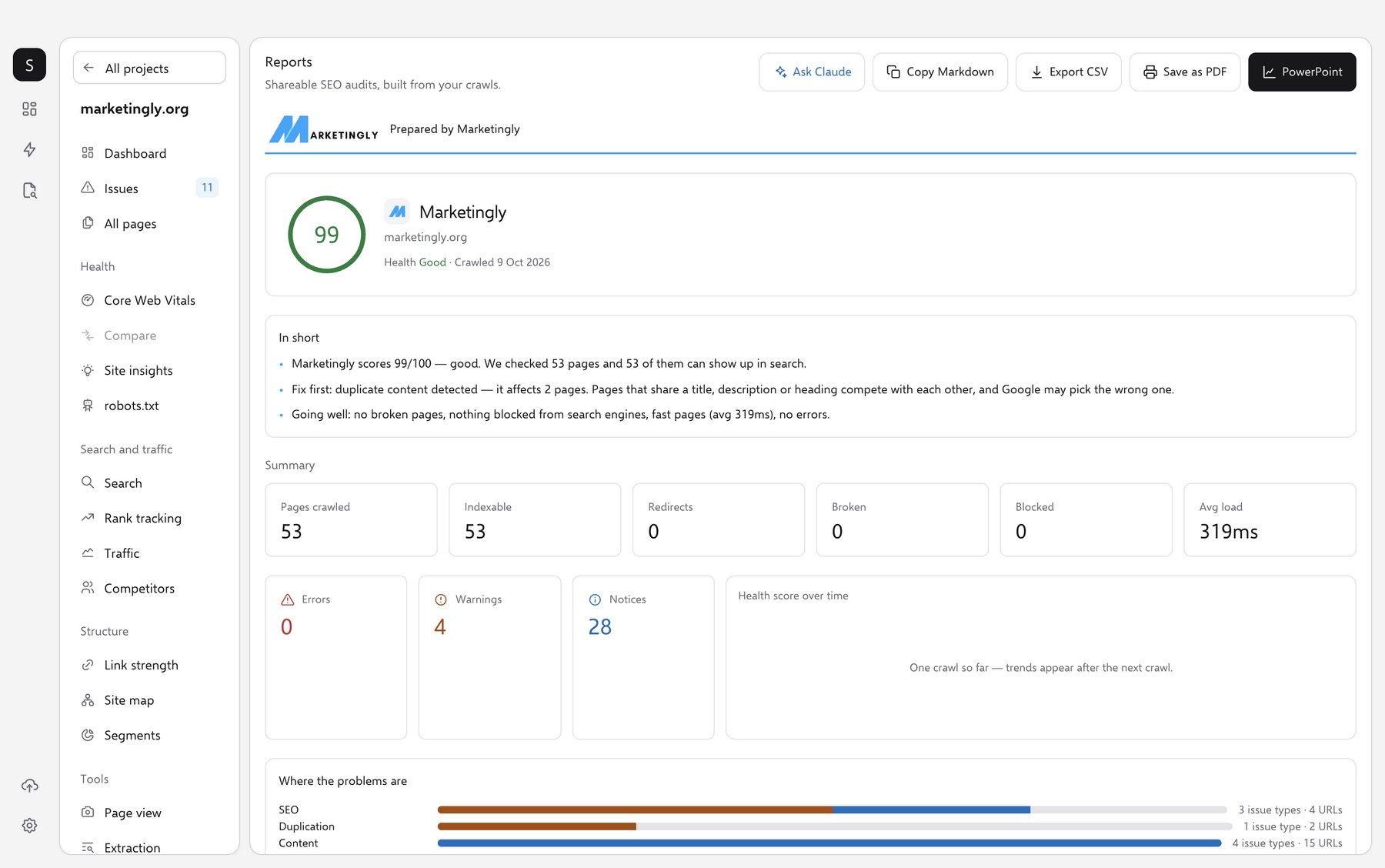
This is the Reports screen of a real crawl of marketingly.org. Your logo sits in the header. Under it: the health score, the short version, the numbers and where the problems are. The buttons at the top turn it into a PowerPoint deck, a PDF, a CSV or a Markdown copy, or ask Claude to write it up.
What white label SEO software does
White label SEO software lets you send audits and reports under your own name. Your client sees your brand, not the tool maker's. With SEOSage you turn on your brand once, and every file you export carries it.
It is made for people who sell SEO or advise on it: freelancers who want to look established, small agencies that sell audits, and consultants who report to several clients. The work is yours, the brand on it is yours, and the tool stays in the background.
- Your company name, logo and website
- Your accent colour and a font you choose
- Your contact link and footer line, for example "Prepared by Your Agency"
- On the PDF report, the Excel workbook, the PowerPoint deck and the top and bottom of a CSV file
Four kinds of white label SEO software
Not every white label tool does the same job. Most fall into one of four groups, and the right one depends on what you sell to your clients.
All-in-one SEO platforms
Rank tracking, keyword and backlink data, site audits and client dashboards in one login. Good if you want one tool for everything. The trade-off: they are large, and often priced by seat, project or tracked keyword, so you pay for a lot you may not use.
Web audit tools
You enter a web address, the tool audits the site in the cloud, and you get a branded report. Good for quick audits. The trade-off: plans often limit the number of pages or audits you can run.
Reporting dashboards
They pull rank, traffic and ad numbers from other tools into one branded dashboard. Good for monthly marketing reports. The trade-off: they mainly show data from other tools, so they do not audit the website themselves.
Desktop crawlers with branded reports
They run on your own computer, crawl every page and export branded files. SEOSage is in this group. Good for audits and progress reports across many client sites on one plan price. The trade-off: there is no client login, and it runs on Mac and Windows only.
Six questions to ask before you pick a tool
The report is the part your client actually sees. Put these questions to any white label SEO tool you are looking at, SEOSage included.
- How deep does the branding go? A logo on the cover is not enough. Check that the colours, font, footer line and contact link change too, and that nothing in the file points back to the tool maker. SEOSage changes the company name, logo, website, contact link, accent colour, font and footer on every export.
- Which file types do you get? Clients open PDFs and PowerPoint decks. You may also want Excel for your own work and CSV for a developer. SEOSage exports all four, and each one carries your brand.
- What are the limits? Look for caps on pages per crawl, audits per month or sites per plan, and ask what happens when you go over. SEOSage has no page or website limit. Very large sites take longer and use more memory on your computer. A plan covers 1, 2 or 5 computers.
- How does the client get the work? Some tools give clients a login to a live dashboard. Others, SEOSage among them, give you a file to send. A file is simple and works with any client. A login suits clients who like to check in themselves.
- What is missing? No tool does everything. SEOSage audits sites and builds reports. It has no backlink or keyword database and no client login. If you need those, use another tool next to it.
- What does it cost per client? Divide the plan price by the number of clients you serve. With a fixed plan price and no limits, every extra client makes the tool cheaper per client, not dearer.
Comparing tools? See how SEOSage stacks up in our honest comparisons, including where the other tool is ahead.
White label software that works with Claude
Most white label tools stop at the export. SEOSage also has a connector for Claude, the AI assistant. Connect it once in Settings, and Claude can read your crawls on your computer, so you can ask for the audit, the fixes and the client update in plain English. It is optional, and Claude is separate from SEOSage: you need your own Claude access.
Ask in plain English
In Claude chat, Cowork or Claude Code, you might ask:
- "Audit client-site.com for me" (SEOSage must be open)
- "What are the worst issues, and how do I fix each one?"
- "What did we fix since the first crawl? Write the client update."
- "Which fixes matter most for the pages that get clicks?"
- "Build a client deck from this crawl"
Claude reads the crawl directly, so you copy nothing over. Your login and passwords are never shared, and Claude cannot change your SEOSage settings.
What Claude can look at
SEOSage gives Claude twelve tools. Most read the crawls saved on your computer.
Your sites and reports
List every site with its health score, read a full audit summary, and list issues ranked by how serious they are.
Fix steps and pages
For any issue: why it matters, how to fix it and the pages affected. Search crawled pages, or filter for broken, slow or missing meta descriptions.
Progress between crawls
List every saved crawl and compare any two: what was fixed, what is new, what improved and what got worse.
Search Console and competitors
Clicks, impressions and top queries from Google Search Console, and the competitors you track, so advice follows what gets traffic.
Start an audit
Ask Claude to crawl a public website and follow it until it finishes. The crawl runs inside SEOSage.
Custom decks
On the Reports page, Ask Claude writes a client summary, a fix-first list or a before-and-after, and Build with Claude designs a bespoke deck.
Search Console numbers need Search Console connected in SEOSage. See how the Claude connector works, or what Claude wrote for the white-label SEO audit reports.
Show progress with compare crawls
A white label report is not a one-off. Crawl again after each round of fixes, pick two crawls, and SEOSage shows what changed. It is how you prove the monthly work to a client, in your brand, as a PDF, Excel, PowerPoint or CSV.
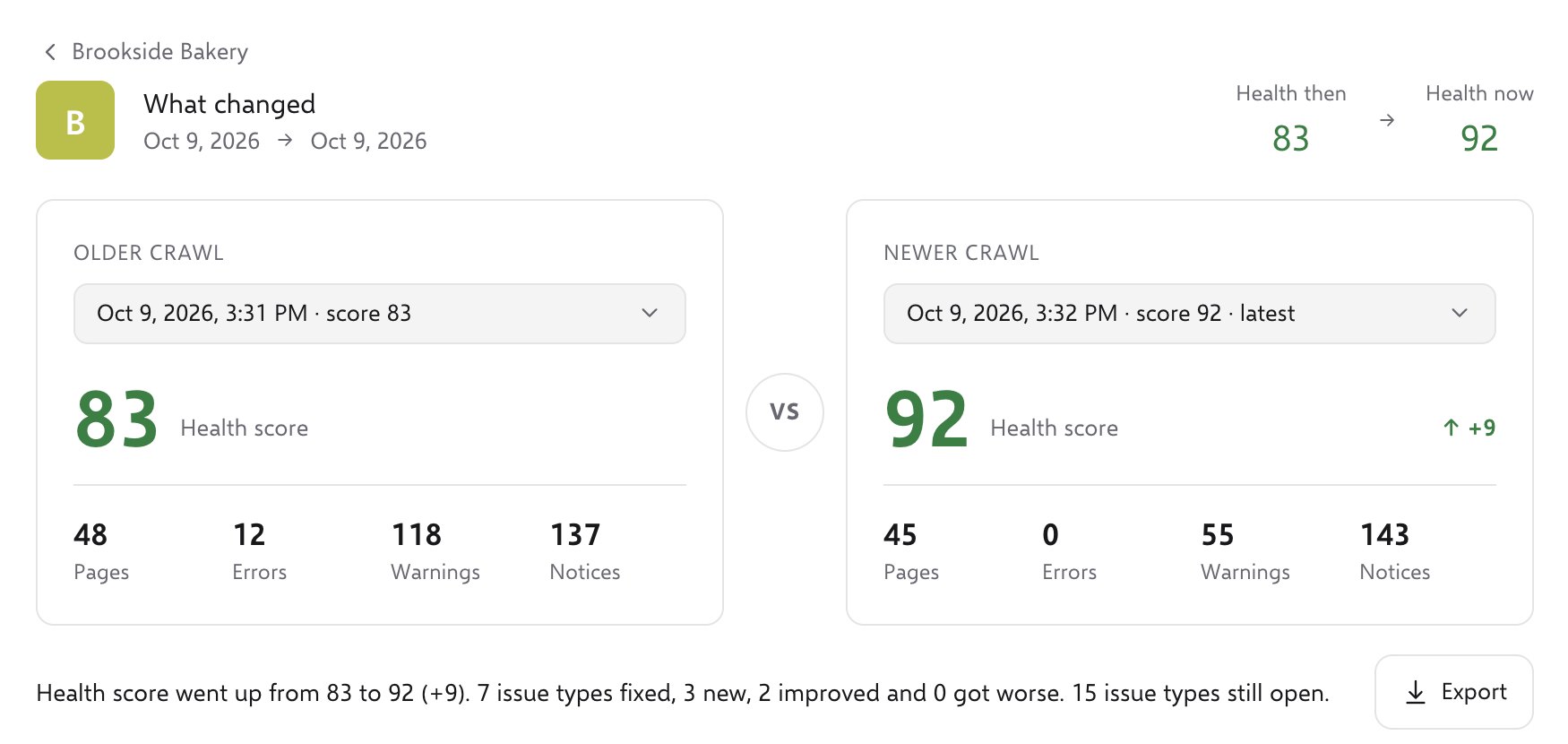
The example is a small made-up site with a before and after. More on compare crawls.
Every feature in every plan
White-labelling is not an add-on. The same plan gives you the whole audit toolkit, on every client site.
SEO crawler
Crawl every page, with no page limit.
Compare crawls
See what was fixed, what is new and what got worse between any two crawls.
Fix and re-check
Re-check a page or issue and see Fixed, Still there or Needs re-crawl.
Weekly to-do list
The week's fixes, ranked across all your client sites.
Rank tracking
Track keywords and export a branded PDF or Excel report.
Search Console report
Google Search Console numbers next to your audit.
Core Web Vitals
A speed test on mobile and desktop, with plain-English fixes.
Page audit
Check a single page in detail and export the checklist.
Competitor analysis
Compare up to five competitors with your own site.
Crawls can also repeat on a schedule: all your sites, one after another, while SEOSage is open. See every feature.
A simple client workflow
Here is how an agency or a freelancer could use SEOSage for one client, from the first audit to the monthly update.
- Crawl and send the first report.Crawl the client's site before you begin. Each client site is its own project. Export a PDF or PowerPoint deck with your brand. Page one gives a plain verdict and what to fix first.
- Work through the fixes.The weekly to-do list ranks fixes across all your clients. Re-check a fix to confirm it is gone.
- Crawl again and show the progress.Run a new crawl each month, by hand or on repeat. Compare two crawls to show what was fixed, what is new and what got worse, and save it as a branded report.
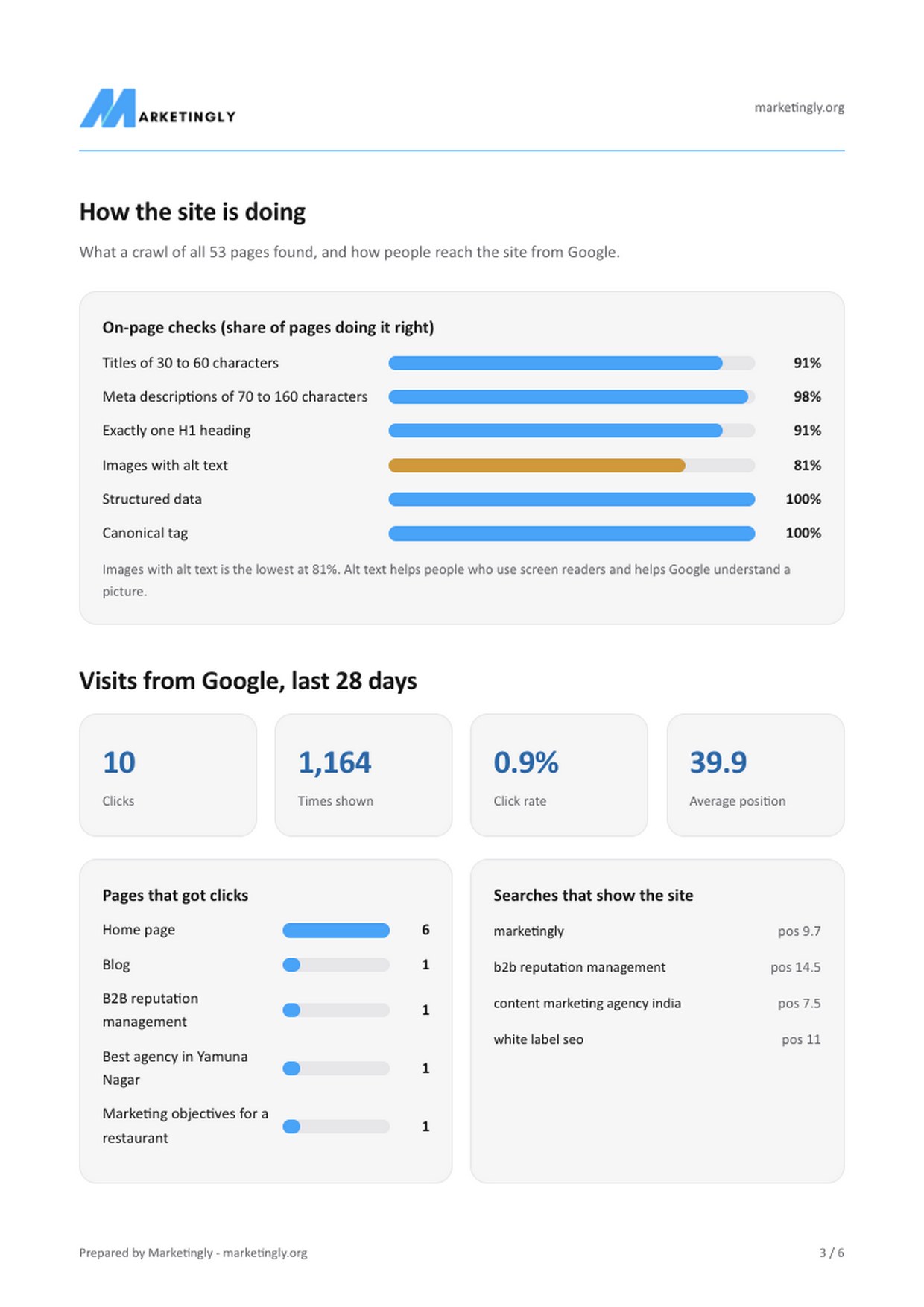
Want to see what the client receives? Download the sample white-label report. Claude wrote it from real data. For the report side in detail, read about white-label SEO audit reports.
One price, no per-client fees
White-labelling comes with every SEOSage plan. Plans start at $9 a month for 1 computer (Pro is $19 for 2, Team is $39 for 5), with a lower price if you pay yearly. The 14-day free trial needs no card. If it is not right for you, ask for a refund within 14 days of your first payment.
Adding another client costs you nothing extra. As an example, ten client sites work out at $1.90 each a month on the monthly plan, or about $1.24 each on the yearly plan.
Questions about white label SEO software
What is white label SEO software?
It is SEO software that lets you send reports and audits under your own name. Your logo, company name and colours replace the tool maker's, so the client sees your brand, not the software's.
What does SEOSage put my brand on?
Your company name, logo, website, contact link, accent colour, font and footer text appear on the PDF report, the Excel workbook, the PowerPoint deck and the header and footer of a CSV export.
Which SEO platforms offer white-label reporting?
Several do, including SEOptimer, SE Ranking, MetricSpot, Sitechecker and Search Atlas. They are mostly web dashboards. SEOSage is a desktop app for Mac and Windows: you crawl on your own computer and send the client a file, with one flat price and no limit on pages or client websites.
Do my clients get a login?
No. SEOSage does not have a client portal. You send your client the PDF, PowerPoint, Excel or CSV file. Only you need the app. If you want clients to log in to a live dashboard, SEOSage is not the right tool.
Can I use it for many clients?
Yes. There is no limit on the number of websites or pages. Each client site is its own project. A plan covers 1, 2 or 5 computers.
Does white-labelling cost extra?
No. It comes with every plan. Plans start at $9 a month for 1 computer, with a lower price if you pay yearly, and the 14-day free trial needs no card.
What does SEOSage not do?
It is an audit and reporting tool. It does not have a backlink or keyword database, and it has no client login. It checks your site, ranks the problems and builds the report. For backlink data you would use another tool next to it.
Is white label SEO software the same as white label SEO services?
No. Software is a tool you use yourself to audit websites and make reports under your own brand. White label SEO services mean another company does the SEO work for you and you resell it. SEOSage is software.
Does it run on Mac and Windows?
Yes. SEOSage is a desktop app for Mac and Windows. It crawls on your own computer, so the crawl data stays on your machine.
How big a website can it crawl?
There is no page cap. In our published benchmark, an 8 GB laptop crawled 201,022 pages in 20 minutes. Very large sites take longer and need more memory.
Does SEOSage work with Claude?
Yes. SEOSage has a connector for Claude, the AI assistant. Connect it once in Settings and Claude, in chat, Cowork or Claude Code, can read your crawls, list and explain issues, compare two crawls, read Google Search Console numbers, and start a new crawl. It is optional, and you need your own Claude access.
Can Claude write the client report?
Yes. On the Reports page the Ask Claude button writes a client summary, a fix-first list, a before-and-after update, or a PowerPoint deck from your real crawl. The downloadable sample report was written by Claude this way, from real data.
Can I try a white-label report before I buy?
Yes. Download the sample white-label report as a PDF with no sign-up, or start the 14-day free trial and brand a report of your own client.
Try it on one client site
Download SEOSage for Mac or Windows, add your brand, and crawl a client's website.