A monthly SEO report is a short document that shows a client what changed on their site this month, what you did and what comes next. The best ones fit on two pages and start with three numbers. Below is a six-section structure, the numbers to use and where to get them, plus a free editable Word template and a filled-in example.
It is written by the maker of SEOSage, an SEO audit app with branded client reports. For a longer look at what a client report can hold, see SEO client report: what to include. This guide is the monthly, ready-to-fill version.
Download the free monthly SEO report template (Word) · See the filled-in example (PDF) · Works in Word, Google Docs and Pages. No sign-up and no email form.
TL;DR
- Use six sections: this month in one page, site health, search results, what we did, what we plan next month and what we need from you.
- Start with three numbers and two sentences. A busy client reads only page one.
- Compare every number with last month, and with the same month last year if the business has seasons.
- Take site health from a crawl and search results from Google Search Console, and write the source beside each number.
- Explain every drop. Send the report on the same day each month.
Why send a monthly SEO report? #
SEO moves slowly, so clients cannot see the work. A monthly report is how they see it. It shows that work happened even in a month when rankings stood still, it records decisions, and it gives you a regular reason to talk. Agencies that report on the same day every month tend to keep clients longer, because the client always knows what is going on. If you white label your reports, the report also carries your brand. See what white label SEO is.
What are the six sections of a monthly SEO report? #
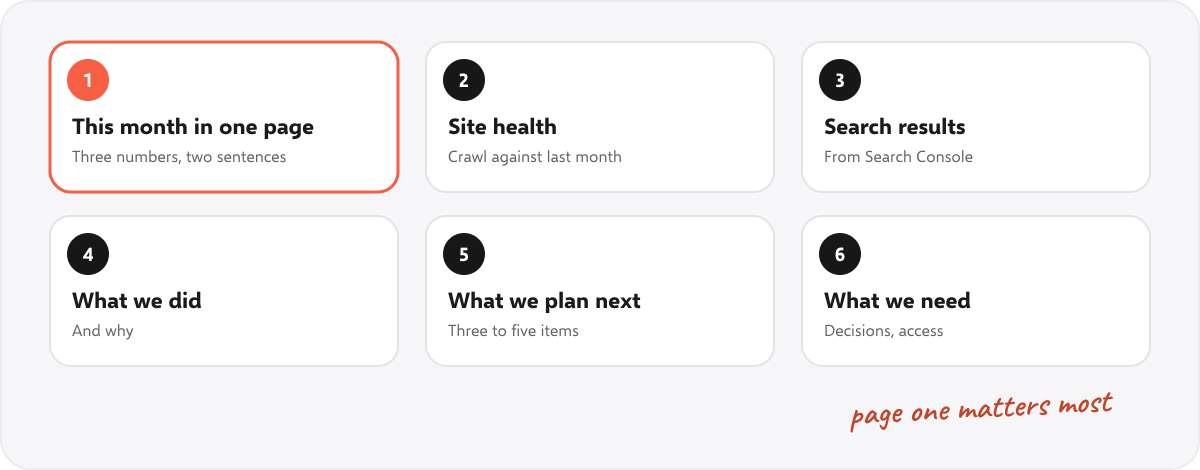
- This month in one page. Three numbers and two sentences: clicks, the change on last month and the health score.
- Site health. A crawl this month against last month: the health score, errors and pages hidden from Google. See what an SEO audit is for what a crawl checks.
- Search results. Clicks, impressions and average position from Google Search Console, with last month and the same month last year.
- What we did. The finished items, each with a reason and a result so far.
- What we plan next month. Three to five items in priority order.
- What we need from you. Decisions, approvals, access or content. Leave it out when there is nothing.
Two pages is enough. If the report grows, move the detail to an appendix and keep page one short.
Which numbers go in a monthly SEO report? #
| Number | Where to get it | Compare with |
|---|---|---|
| Health score, errors, pages hidden from Google | A site crawl once a month. The compare view in SEOSage shows what was fixed, what is new and what got worse. | Last month |
| Clicks, impressions, average position | Google Search Console, Performance report | Last month and the same month last year |
| Top pages and top searches | Search Console, Pages and Queries tabs | Last month |
| Enquiries, sales or calls from search | The client’s analytics, call log or order records | Last month and last year |
| Work finished | Your task list | The plan from last month |
Use the same date range every time. Calendar months are the easiest to compare, and they match what the client sees in their own tools.
How do you make the report easy to read? #
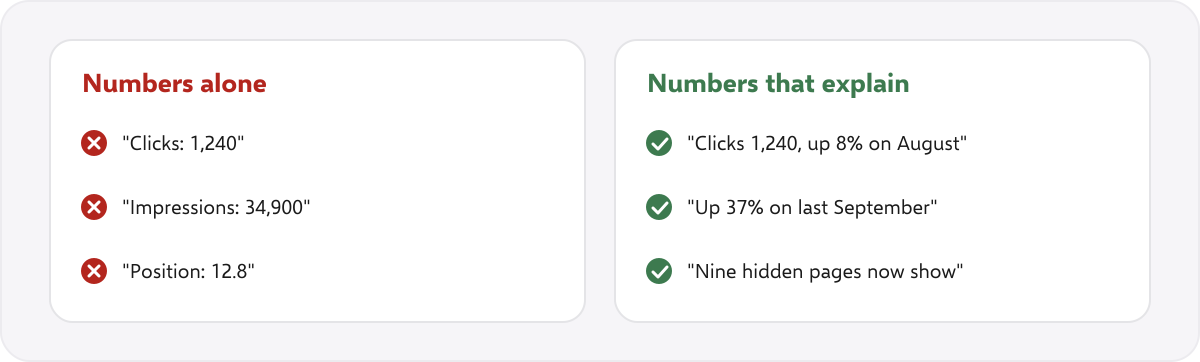
- Explain every change. A number with a reason (“up 8% because nine hidden pages now show”) is worth more than ten numbers alone.
- Explain every drop. A drop with a reason builds trust. A drop left out makes the client wonder what else is missing.
- Use plain words. Write “pages hidden from Google”, not “noindex directives”.
- Add one line for anything unusual: a site change, a sale, a holiday or an update to Google’s results.
- Send it on the same day each month, with a short email that repeats the three headline numbers.
How do you make a monthly SEO report in an hour? #
- Crawl the site and open the compare view against last month. Note the health score and what was fixed.
- Export Search Console for the calendar month, the month before and the same month last year.
- Fill in the template, section by section. Replace every yellow bracket and delete the tips.
- Write page one last, from the rest of the report.
- Read it as the client and cut anything they would skip.
- Send it with a short email and book the call.
What does a finished monthly SEO report look like? #
We made a two-page example for a made-up bakery, with made-up numbers, so you can see the layout and the level of detail. Open the example (PDF). Every name and number in it is invented, and it says so on the first page. For a real audit report with a client’s logo, see our white label SEO audit reports.
How does SEOSage help with monthly reports? #
SEOSage is a desktop SEO audit app for Mac and Windows that crawls on your own computer with no page limit. It saves every crawl, so last month is always there to compare. It exports a branded PDF, PowerPoint, Excel or CSV report with your logo, on every plan. Plans start at $9 a month, and the free trial lasts 14 days. It shows Search Console numbers and tracks the keywords you pin, but enquiries and sales come from the client’s own records, and it does not send reports on a schedule, so you send each one yourself.
Common mistakes in monthly SEO reports #
- Too many numbers. Ten numbers that matter beat fifty that do not.
- No comparison. A number alone says nothing.
- Jargon. The client is not an SEO.
- Hiding drops. It always comes out later.
- No next step. End with what happens next month.
- A different layout every month. Use one template, so clients learn where to look.
Summary #
A good monthly SEO report is short, regular and honest. Use six sections, start with three numbers, compare with last month and last year, explain every change, and send it on the same day each month. Our free template does the layout for you.
FAQ #
What should a monthly SEO report include? #
This month in one page, site health, search results, what you did, what you plan next month and what you need from the client.
How long should a monthly SEO report be? #
Two pages is enough, with the detail in an appendix if needed.
Is there a free monthly SEO report template? #
Yes. Download ours in Word. It opens in Google Docs and Pages too.
Which metrics belong in a monthly SEO report? #
Health score, errors and pages hidden from Google from a crawl, clicks, impressions and average position from Search Console, and the client’s own enquiries or sales.
When should I send the report? #
On the same day every month, a few days after the month ends, so Search Console numbers are complete.
How do I report a drop in traffic? #
Say it plainly, give the likely reason, show what you checked and say what you will do next.
Can I put my own logo on the report? #
Yes. In the template, replace the logo placeholder. SEOSage’s exports also carry your logo on every plan.