A broken link is a link that leads to a page that does not exist or cannot be reached, and a 404 error is what the visitor sees when they follow it. The fix is not always to remove the error. For each broken link you decide to restore the page, redirect it to a close match, correct the link, or leave it as a 404. This guide shows how to find broken links, how to choose, and how to fix them in the right order.
It is written by the maker of SEOSage, an SEO audit app that crawls your site and lists every broken link with the pages that contain it. In a crawl of marketingly.org on 29 September 2026, SEOSage found 4 error pages. Small sites often have a few, and large sites have many.
TL;DR
- A 404 is not always a problem. A page removed on purpose should return one.
- The real harm is links to pages that do not exist, especially links on your own site.
- Find broken links with a crawl, Google Search Console and, on bigger sites, server logs.
- Choose one of four fixes for each: restore, redirect (301) to a close match, fix the link, or leave it.
- Crawl again to check, and keep a custom 404 page that still returns a real 404 status.
This guide is part of our series on how to do an SEO audit. Keep your findings in the free SEO audit template.
What are broken links and 404 errors? #
A 404 error means the server could not find the page. A broken link is any link that leads to a 404 or another error. There are two kinds. An internal broken link is on your site and points to another page on your site. An external broken link points to someone else’s site. Both disappoint visitors, and internal ones also waste the time search engines spend crawling your site.
A 404 is a correct answer for a page that is gone. Google has said that 404 errors do not harm a site as a whole, so a few are normal. What you should fix are the ones that have links or visits, and the links to them.
How do you find broken links? #
- Crawl your site. A crawler follows every link and lists the ones that fail, with the page each is on. In SEOSage look for the issues 404 Client Error and Page links to broken page, and Broken external link for other sites.
- Look in Google Search Console. The Pages report lists Not found (404) addresses Google has found. These include links from other sites that you cannot see in a crawl.
- Check your server logs if your site is large. They show which missing addresses are actually requested.
A crawl finds broken links you have created. Search Console also shows addresses other sites link to. Use both. Our technical SEO audit checklist includes status codes and redirects as one of its five groups.
How do you fix a broken link? The four choices #
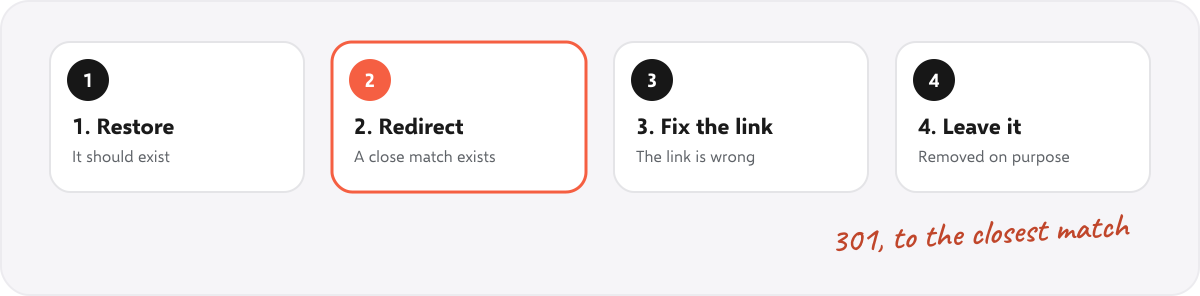
| Choice | Use it when | How |
|---|---|---|
| 1. Restore the page | The page should still exist, for example it was deleted by mistake | Bring it back at the same address |
| 2. Redirect (301) | The page moved or was replaced, and a close match exists | 301 redirect to the closest page, not to the home page |
| 3. Fix the link | The link has a typo or points to an old address | Edit the link on the page that contains it |
| 4. Leave it as a 404 (or 410) | The page was removed on purpose and has no close match | Remove the links to it, and let it return 404 or 410 |
For a page with many links or visits, redirecting is usually best. For a link you control, editing the link is better than leaving a redirect, because every redirect adds a step.
In what order should you fix them? #
- Internal links to missing pages on important pages. You control these, and visitors see them.
- Missing pages that have links from other sites or past visits. Redirect them to keep what they earned.
- Missing pages in your sitemap. Remove them, because a sitemap should list only live pages.
- Broken external links. Replace, update or remove them.
- The rest. Tidy up when you have time.
What are the rules for redirects? #
- Use a 301 (permanent) redirect for pages that have moved for good.
- Redirect to the closest matching page. Sending every missing page to the home page is treated like a missing page and does not help visitors.
- Keep it to one step. A redirect that leads to another redirect is a chain, and should be shortened.
- After a redirect, update internal links to the final address. SEOSage flags these as Page links to redirect.
What should a good 404 page do? #
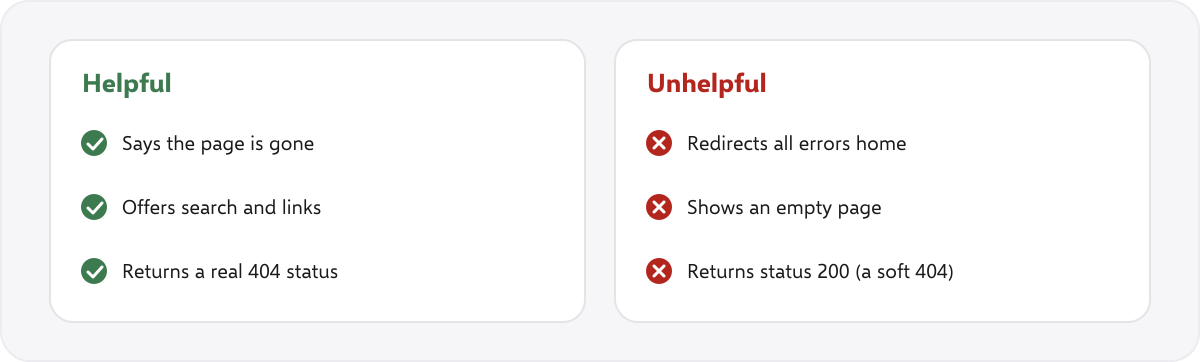
Every site needs a custom 404 page. It should say the page was not found, offer a search box and links to the main sections, and still return a real 404 status. If an error page returns status 200, search engines treat it as a normal page. That is a soft 404, and it fills the index with empty pages.
What is the checklist to fix broken links? #
- Crawl the site and export the broken links with the pages that contain them.
- Open Search Console and list the Not found (404) addresses.
- Choose one of the four fixes for each address.
- Fix internal links first, then redirect pages with outside links.
- Remove dead addresses from the sitemap.
- Check that your 404 page returns a real 404 status.
- Crawl again. The compare view shows what was fixed, what is new and what got worse.
How does SEOSage help find broken links? #
SEOSage is a desktop SEO audit app for Mac and Windows that crawls on your own computer with no page limit. It lists broken pages, the pages that link to them, links to redirects and broken external links, and it compares two crawls so you can confirm the fixes. Plans start at $9 a month, and the free trial lasts 14 days. It sees what a crawl can reach, so addresses that only other sites link to appear in Search Console, not in the crawl.
Common mistakes with broken links #
- Redirecting everything to the home page. Visitors and search engines see this as a missing page.
- Fixing a redirect and leaving the links. Edit the links so they go straight to the right page.
- Soft 404s. An error page that returns status 200 is worse than a real 404.
- Ignoring external links. A page full of dead links looks neglected.
- Leaving dead pages in the sitemap. A sitemap should list only live, indexable pages.
- Not checking again. Crawl after fixes to be sure.
Summary #
A 404 is fine for a page that is gone. The problem is links to it. Find broken links with a crawl and Search Console, choose one of four fixes for each (restore, redirect, fix the link or leave it), fix internal links first and keep a custom 404 page that still returns a real 404 status.
FAQ #
Do 404 errors hurt SEO? #
A few 404s do not harm a site as a whole. Links to missing pages waste visitors’ time and crawl effort, so fix those, especially internal ones.
How do I find broken links on my website? #
Crawl the site, and check the Not found (404) list in Google Search Console.
Should I redirect a 404 page? #
Redirect it with a 301 if a close match exists, or if it has links or visits. If the page was removed on purpose and has no match, leave it as a 404 or 410.
What is a soft 404? #
A page that says “not found” but returns status 200. Return a real 404 or 410 instead, or redirect to a relevant page.
Should I redirect all 404s to the home page? #
No. Redirect to the closest matching page. Sending everything to the home page does not help visitors.
How often should I check for broken links? #
Crawl monthly, and after any site change such as a redesign or a move.
What is the difference between 404 and 410? #
404 means not found. 410 means gone for good. Both tell search engines the page is not there, and 410 is a slightly stronger signal.
Recommended #
- Technical SEO Audit Checklist: 25 Checks + Free PDF
- On-Page SEO Checklist: 20 Checks for Every Page
- What Is an SEO Audit? What It Includes (Real Example)
- Website Audit Report: Free Template and Example (Word, PDF)
- How to Do an SEO Audit: 12 Steps (With Free Tools)
- Canonical Tag Issues: 10 Problems, Checked on 177 Top Sites
- Duplicate Title Tags: How to Find and Fix Them (With Examples)
- Orphan Pages in SEO: How to Find and Fix Them
Run your own SEO audit
SEOSage crawls every page of your website, lists what is wrong and turns it into a report you can send to a client.