An internal linking audit checks how the pages of a website link to each other, to find pages that are hard to reach, links that are broken or wasteful, and link text that says nothing. It matters because internal links decide how search engines and visitors move through a site and which pages look important. This guide gives you eight steps, the issues to look for and a real example from a crawl.
It is written by the maker of SEOSage, an SEO audit app that counts the links to every page and suggests where to add the missing ones. The method works with any crawler.
TL;DR
- An internal linking audit looks for seven problems: orphan pages, weakly linked pages, dead-end pages, broken links, links to redirects, deep pages and vague link text.
- Start with the pages that matter most, and count how many other pages link to each.
- Fix broken links and links to redirects first. They are quick and they help every crawl.
- Add links from related, strong pages to the pages you want to lift, with descriptive link text.
- Crawl again, compare, and repeat every month.
What is an internal linking audit? #
An internal linking audit is a review of the links between the pages of one website, to make sure the important pages are easy to reach, well supported and clearly described. It uses a crawl, because a crawler follows every link and counts them.
It is one part of a full SEO audit, and it sits in the “links and structure” group of our technical SEO audit checklist.
Why do internal links matter for SEO? #
- Discovery. Search engines find pages by following links. A page that is linked is found faster than one that is not.
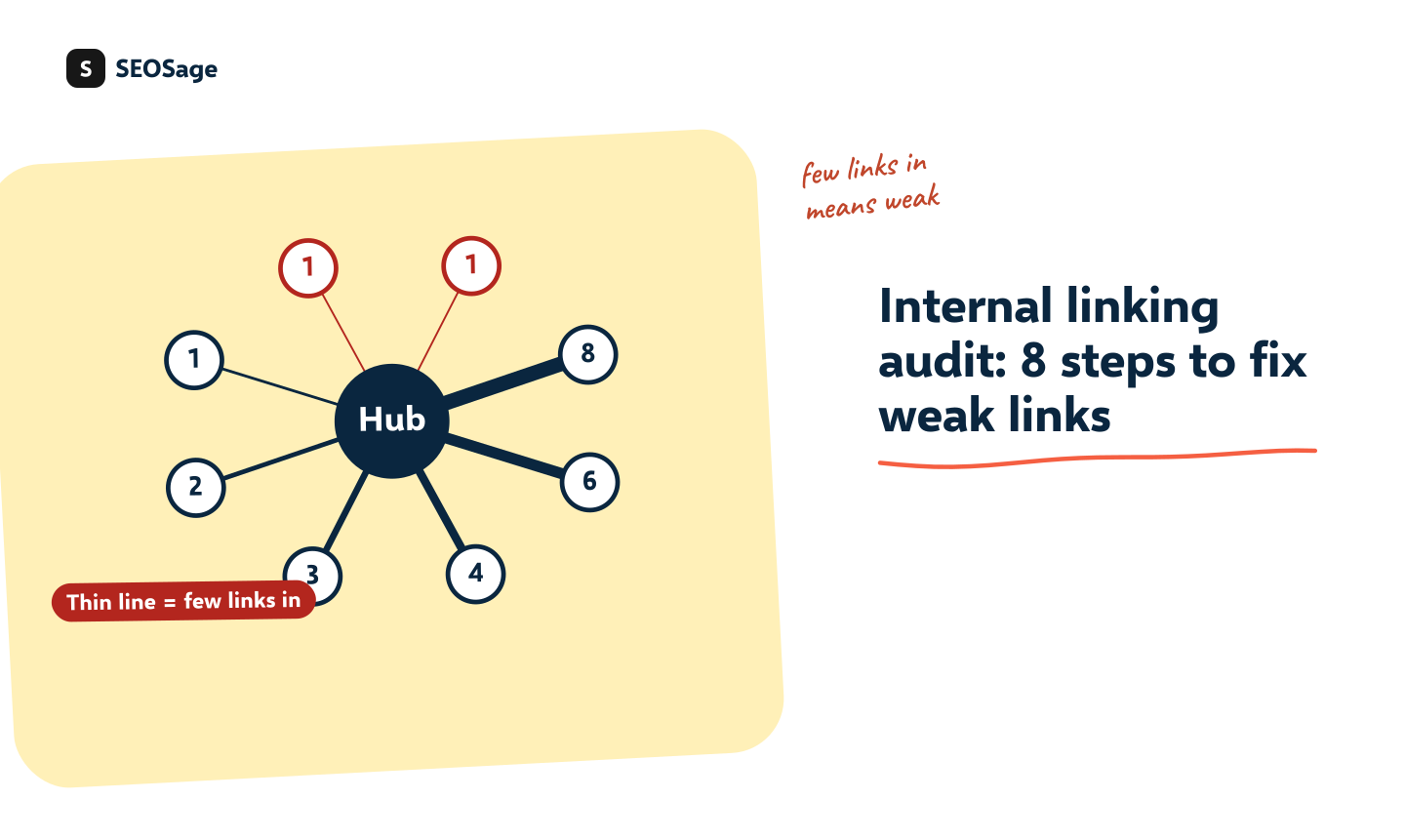
- Importance. Pages that many other pages link to look more important than pages that few link to.
- Meaning. The link text tells the reader and the search engine what the target page is about.
- Journeys. Links move visitors from articles to the pages that sell, which is where an SEO visit becomes a result.
Unlike links from other sites, you control all of them. That makes an internal linking audit one of the cheapest, fastest wins in SEO.
What problems does an internal linking audit find? #
A crawl lists seven kinds of problem. This table shows each, why it matters and what SEOSage calls it:
| Problem | Why it matters | SEOSage shows it as |
|---|---|---|
| Orphan pages | No page links to them, so they are hard to find. See our guide to orphan pages. | Orphan page |
| Weakly linked pages | Only one link points to them, so one edit could orphan them | Page has only one dofollow incoming internal link |
| Dead-end pages | The page has no links out, so visitors have nowhere to go | Page has no outgoing links |
| Broken internal links | They lead to an error page and waste a crawler’s time | Page links to broken page |
| Links to redirects | Each takes an extra step. Link to the final address instead. | Page links to redirect |
| Deep pages | Pages many clicks from the home page get crawled less and look less important | Link strength: pages five or more clicks deep |
| Vague link text | “Click here” says nothing about the target | Vague link text |
What does it look like on a real site? #
We crawled an online store, marketplace.uvation.com, with SEOSage on 14 October 2026. It checked 353 pages. The internal linking findings were:
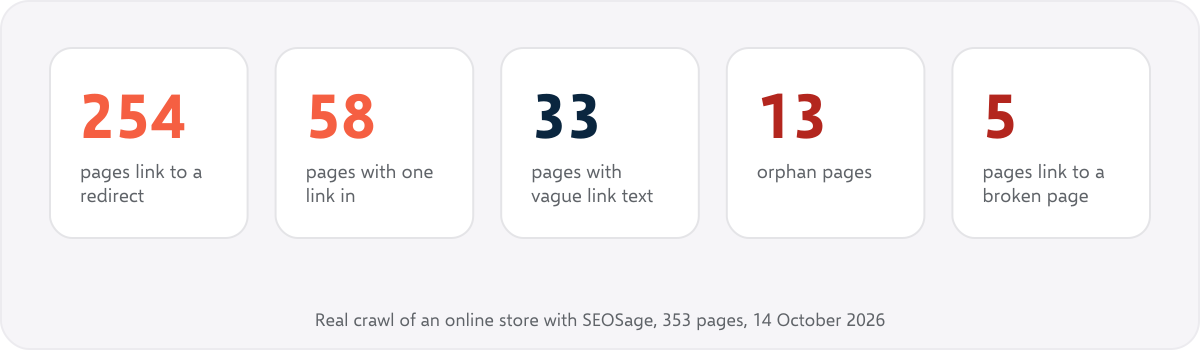
The biggest number is 254 pages that link to an address that redirects. That is a quick fix, because the links can be changed to the final address, and it is a typical result after a site has been reorganised. The 58 pages with a single link and the 13 orphans are the ones to protect. In the earlier crawl of marketingly.org, on 29 September 2026, 147 pages linked to a redirect and one page was an orphan, so the pattern shows up on small sites too.
How do you do an internal linking audit? The 8 steps #
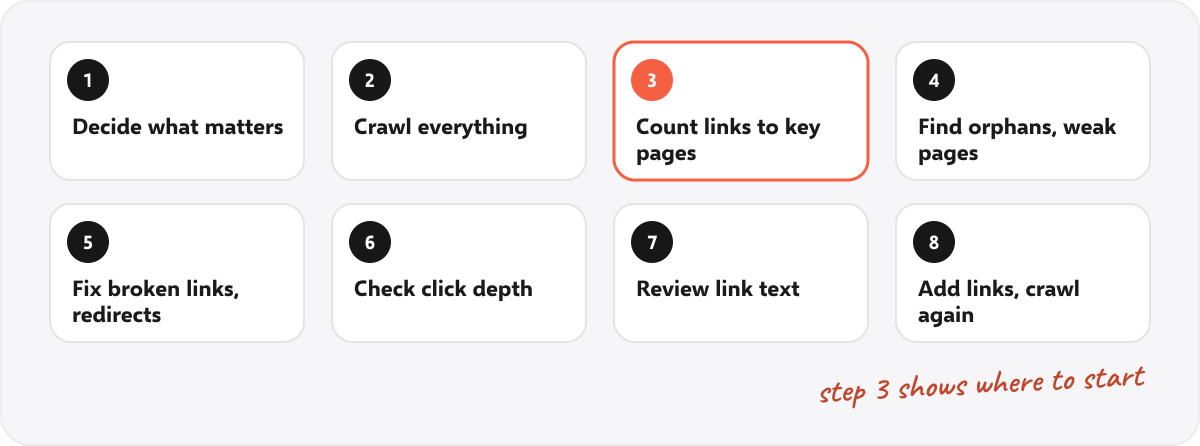
Step 1: Decide which pages matter #
Make a short list of the pages that earn the business money or visits: product and service pages, the best articles, the main categories. This is the list you audit hardest. Search Console and analytics show which pages these are.
Step 2: Crawl the whole site #
Crawl every page, not a sample, because link counts are only right when the crawl reaches everything. SEOSage has no page limit. Let the crawl finish before you read the orphan list, because on a crawl you stopped early a page can look unlinked only because the pages that link to it were not reached.
Step 3: Count the links to each key page #
For each page on your list, look at how many other pages link to it. In SEOSage, the Internal links screen shows how many pages link to each page, and a chart of the link counts for the whole site. A key page with a handful of links, or one, is a candidate for more.
Step 4: Find orphans and weakly linked pages #
List the pages with no links and the pages with one. Decide what to do with each, as in our guide to orphan pages. For the pages that should be found, add links.
Step 5: Fix broken links and links to redirects #
These are the easiest fixes. A broken internal link should point to the right page or be removed. A link to a redirect should point to the final address. The free internal link checker tests one page, and the free redirect chain checker tests one address.
Step 6: Check click depth #
Look at how many clicks it takes to reach your key pages from the home page. Pages that are five or more clicks deep are weak candidates for ranking. Move them closer with links from the menu, the home page or hub pages. SEOSage’s link strength view flags pages that sit deep.
Step 7: Review the link text #
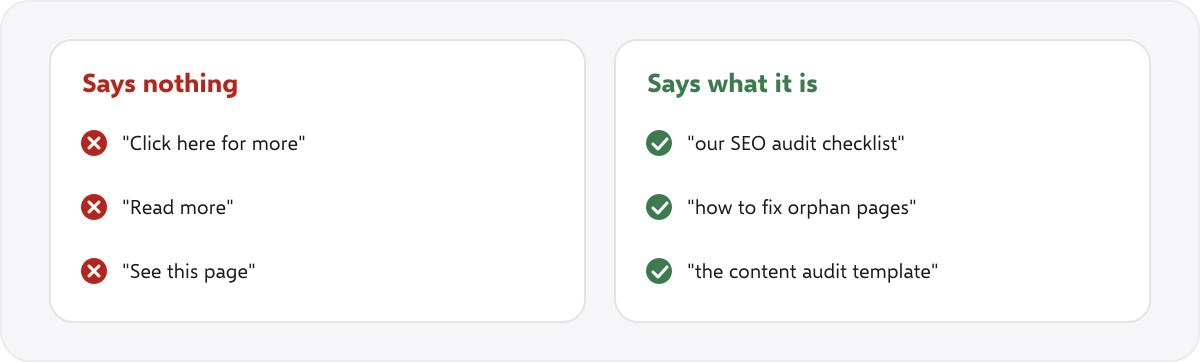
Good link text describes the page it points to. Bad link text is “click here”, “read more” and “this page”. Rewrite vague links to name the destination. Vary the text a little, so that every link to a page is not word for word the same.
Step 8: Add the missing links, then crawl again #
For each page that needs links, find two or three related pages with more strength and add a link in the body of the text, where it helps the reader. SEOSage’s internal linking tool suggests up to three related pages to link from and the anchor text to use. It reads your pages and does not edit them, so you add the link yourself. After the edits, crawl again and use the compare view to see the numbers move.
How many internal links should a page have? #
There is no magic number. Each link should help a reader. A key page should be reachable from the menu or a hub page and have several links from related pages. A long article can carry many links, as long as each is useful. A page packed with links that nobody would click is not helping anyone.
What does a good internal linking structure look like? #
A common pattern is a hub and its spokes. A hub page covers a topic broadly. Spoke pages cover parts of it in detail. Each spoke links up to the hub, the hub links down to every spoke, and spokes link to each other where it is natural. It keeps related pages together and makes the structure easy for a crawler to follow.
We use this on our own blog. Our guide to doing an SEO audit is the hub, and each detailed guide, such as the content audit and the technical checklist, links back to it, and it links to them.
What is the difference between internal links and backlinks? #
An internal link goes from one page of your site to another page of the same site. A backlink comes from a different website. You control internal links completely and backlinks only partly. Internal links are the first thing to fix, because they cost nothing and a crawl finds every problem. Backlinks need outreach and a tool that can see other sites, which SEOSage does not have.
What should you look for on different kinds of site? #
| Site | Focus of the audit |
|---|---|
| Blog or publisher | Every new article linked from related articles and a hub. Old posts linked to newer ones. |
| Online store | Products linked from their category and from related products. Removed products no longer linked. See the ecommerce SEO audit checklist. |
| Software company | Articles linking to feature and pricing pages. See the SaaS SEO audit checklist. |
| Local business | Each location page linked from the home page and a locations page. See the local SEO audit. |
| Agency or service site | Service pages linked to the proof that supports them, such as case studies. |
Which tools do you need? #
- A crawler that counts links. SEOSage runs on your own computer with no page limit, from $9 a month and a 14-day free trial.
- Google Search Console, which has a Links report with internal links by page.
- Free one-page tools, such as the internal link checker.
SEOSage has no backlink database. For links from other sites, you need a backlink tool.
Common internal linking mistakes #
- Linking only from the footer and menu. Links in the body of related pages carry more meaning.
- Using the same exact anchor text everywhere. Describe the page and vary the words.
- Leaving links to redirects. Update them after every move.
- Adding links without reading the page. A link must fit the sentence and the reader.
- Auditing once. New pages create new orphans, so crawl monthly.
Summary #
An internal linking audit finds pages that are hard to reach, links that are broken or wasteful, and link text that says nothing. Decide which pages matter, crawl everything, count links to your key pages, fix orphans, broken links and redirects, check click depth and link text, then add the missing links and crawl again. It is one of the cheapest changes in SEO because you control every link.
FAQ #
What is an internal linking audit? #
It is a review of the links between the pages of one site, to make sure important pages are easy to reach, supported by links and described by clear link text.
How do I do an internal linking audit? #
Crawl the whole site, count the links to your key pages, find orphans and weakly linked pages, fix broken links and links to redirects, check click depth and anchor text, then add missing links and crawl again.
What is the best tool for an internal linking audit? #
A crawler that counts links and lists orphan pages. SEOSage shows link counts, flags orphan and weakly linked pages and suggests where to add links.
How many internal links should a page have? #
There is no fixed number. Each link should help a reader, and key pages should be reachable from the menu or a hub and linked from several related pages.
Do internal links help rankings? #
They help search engines find pages, understand what the pages are about and judge which pages matter. They do not guarantee a ranking.
What is good anchor text for an internal link? #
Text that describes the target page, such as the page’s heading. Avoid “click here” and “read more”.
How often should I audit internal links? #
Run a full audit when you take on a site and after any move or redesign. Then crawl monthly and look at the orphan list and the weakly linked pages.
Does SEOSage change my links? #
No. SEOSage only reads your pages and suggests links. You add them in your own editor.